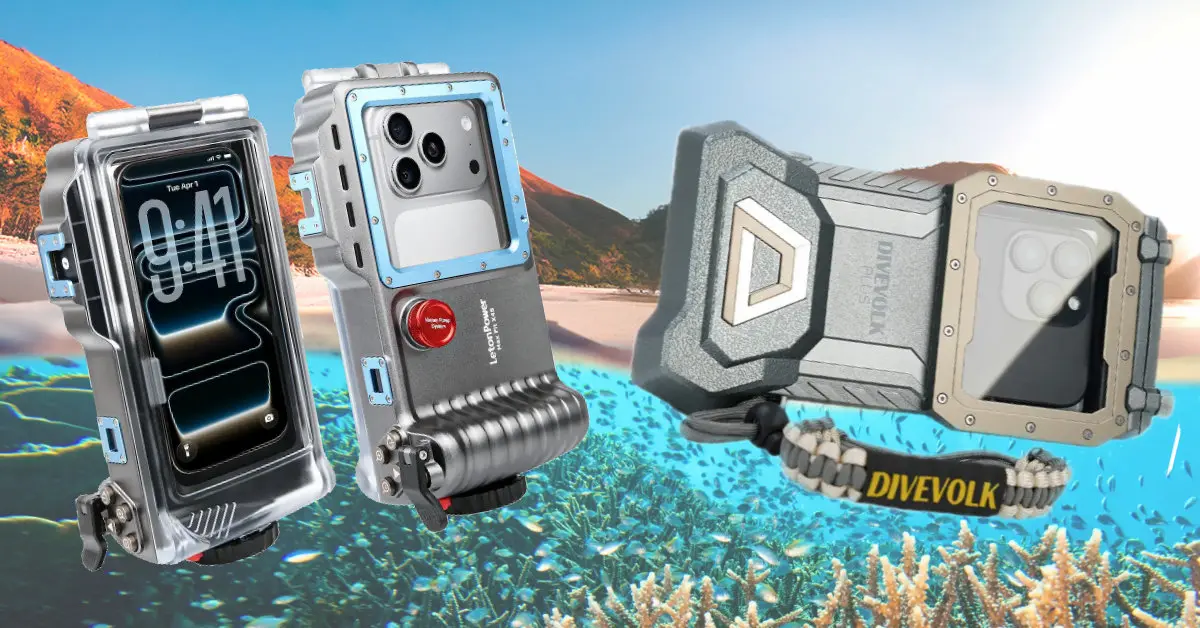
LetonPower X45 vs Divevolk: Which Underwater Phone Case Is Better?
Aaron & Cassie | Scuba Diving Gear & Underwater Photography
Your smartphone might already be one of the best cameras you own. But is putting it inside an underwater housing really a practical alternative to buying a dedicated underwater camera?
We’ve spent years filming underwater with everything from compact action cameras to large DSLR and mirrorless setups. More recently, we took the Divevolk SeaTouch 4 Max Plus scuba diving in Koh Tao, Thailand, to see how a smartphone compared with our usual action camera rig.
The results were surprisingly mixed.
We loved the creative freedom, touchscreen access and convenience of filming directly onto our phones. But we also encountered frustrating setup requirements, missed shots, overheating and fogging.
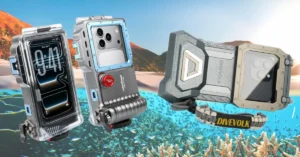
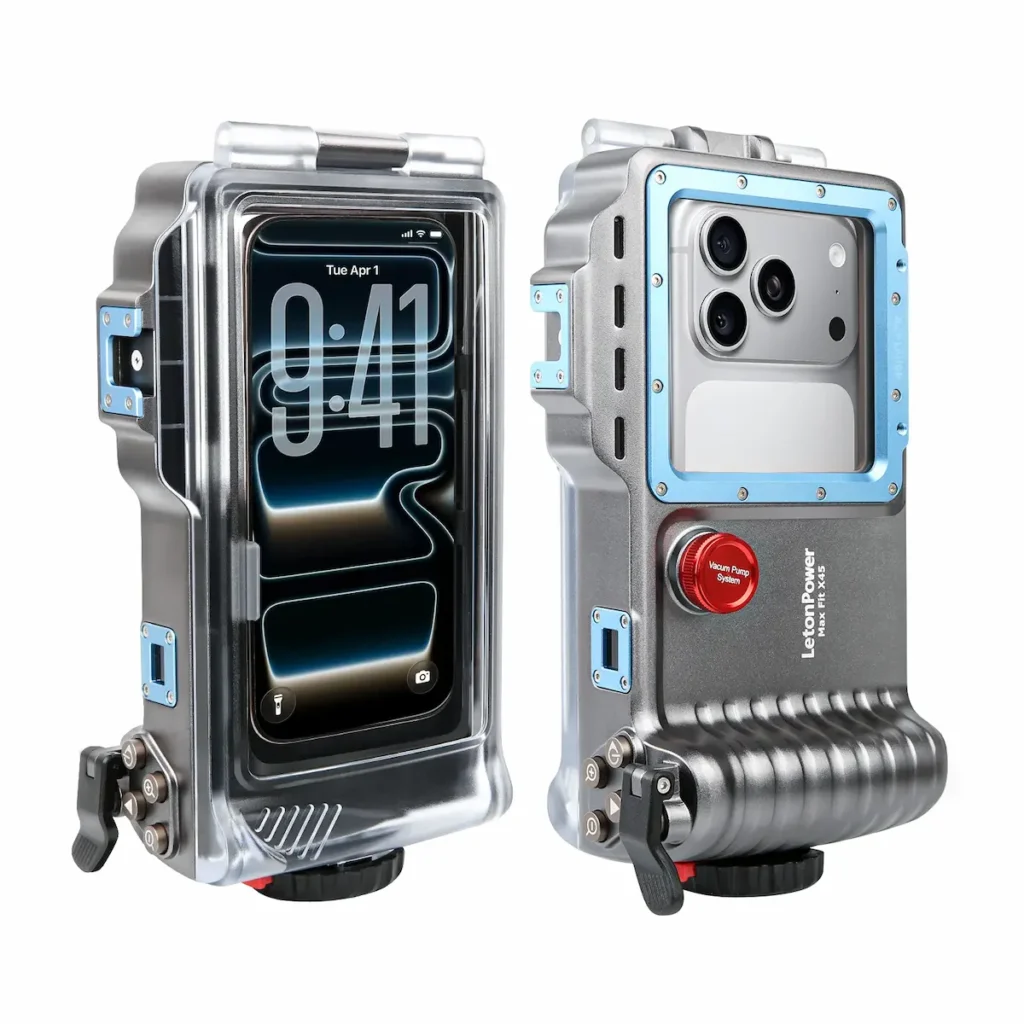
Then LetonPower sent us its X45 underwater smartphone housing, with an aluminium body, physical Bluetooth camera controls, a hinged rear door and an included manual vacuum pump.
On paper, it appeared to address several of our biggest complaints about the Divevolk.
But does it?
In this comparison, we’re looking beyond the marketing specifications to examine what these two underwater phone cases actually offer, where their designs differ, and which might be more suitable for your diving and underwater photography.
An important distinction: We’ve tested the Divevolk SeaTouch 4 Max Plus on real scuba dives. Our findings about the LetonPower X45 are based on hands-on examination and dry-land testing. We haven’t yet tested the X45 underwater, so this is not a head-to-head underwater performance test.
Editorial disclosure: Both housings were supplied to us free of charge by their respective manufacturers. Neither company paid us for our reviews. This article contains affiliate links, which may earn us a commission at no additional cost to you. Our observations and opinions remain our own.
Watch Our LetonPower X45 vs Divevolk Comparison
Table of Contents
LetonPower X45 vs Divevolk SeaTouch 4 Max Plus: Quick Comparison
|
Feature |
LetonPower X45 |
Divevolk SeaTouch 4 Max Plus |
|---|---|---|
|
Control system |
Physical Bluetooth buttons |
Flexible touchscreen membrane |
|
Manufacturer depth rating |
45 m |
60 m |
|
Housing construction |
Aluminium-alloy chassis, polycarbonate rear door |
Rigid housing with flexible touchscreen membrane |
|
Phone installation |
Hinged rear door, adjustable clamp |
Narrow loading opening, phone-specific adapter |
|
Screen protector |
Worked with ours fitted on land |
Removal improved responsiveness during our dives |
|
Seal checking |
Manual vacuum pump included; no confirmed electronic monitoring |
Conventional seal inspection; no integrated vacuum monitoring in our unit |
|
Camera apps |
Native camera app; control mapping varies |
Native and compatible third-party camera apps |
|
Wet-lens ecosystem |
Compatible options not established in our review |
Established range of compatible accessories |
|
Our testing |
Hands-on, dry-land only |
Real-world scuba diving |
|
Main attraction |
Convenient loading and tactile controls |
Creative flexibility and full touchscreen access |
Depth ratings are manufacturer specifications, not independently verified results from our testing. Exact phone compatibility, included accessories and current product specifications should be checked before purchase.
📱 New to Underwater Smartphone Photography?
Your phone might already be the camera you need. But is your setup ready for a dive?
We’ve created a free, printable beginner’s checklist to help you choose a compatible housing, avoid common setup mistakes and prepare your smartphone for its first underwater adventure.
✓ What to check before buying a housing
✓ Essential equipment (and what you can skip)
✓ Pre-dive phone and housing checklist
✓ Lessons from our real underwater testing
GET YOUR FREE UNDERWATER PHOTOGRAPHY CHECKLIST →
No expensive camera system required to get started — just the right preparation.
The short answer
The LetonPower X45 is particularly appealing if you dislike complicated phone-loading procedures, want physical camera buttons and prefer not to remove your everyday screen protector.
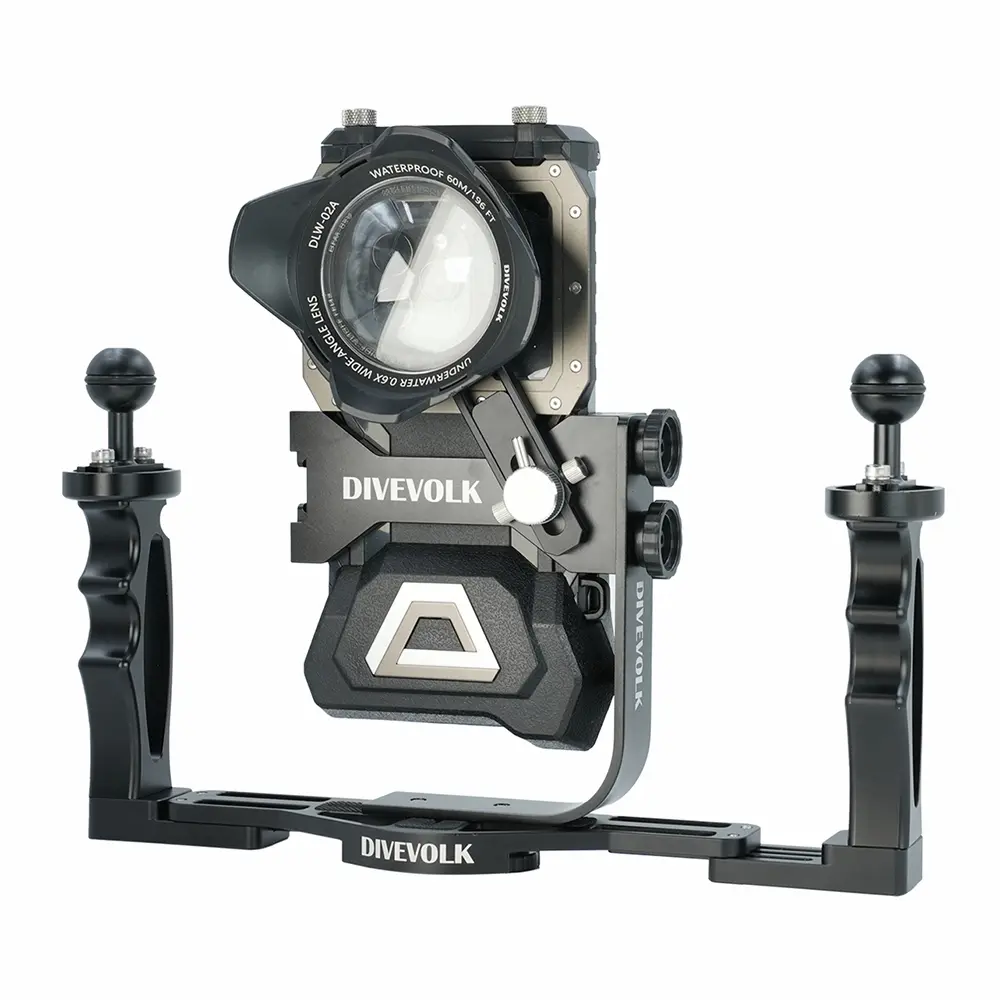
The Divevolk SeaTouch 4 Max Plus is especially attractive if you want broad access to your phone’s camera settings and an established system of underwater photography accessories.
However, the X45’s camera-mode switching was inconsistent with both Google Pixel phones we tried, while our Divevolk setup required several adjustments before it worked reliably underwater.
Neither design is without compromises.
LetonPower X45
Physical controls and easier phone access
Code: AARONCASSIE — 15% off sitewide
Divevolk SeaTouch
Touchscreen freedom and wet-lens options
Code: aaronandcassie — 6% off sitewide
What Is an Underwater Smartphone Housing?
An underwater smartphone housing is a protective enclosure designed to allow a compatible phone to be used for photography or video below the surface.
Unlike a basic waterproof pouch, a purpose-built scuba diving housing must accommodate increasing water pressure while maintaining a watertight seal and providing some way to operate the camera.
That last requirement is where designs begin to differ significantly.
Some housings use a flexible membrane that transfers finger pressure to the phone’s touchscreen. Others use physical controls, Bluetooth connections or dedicated camera applications.
The housing’s depth rating matters, but so do the reliability of its seals, ease of operation, compatibility with your phone and ability to accommodate underwater lighting or additional lenses.
A waterproof pouch suitable for snorkelling is not automatically suitable for scuba diving. Even a housing with an appropriate depth rating can flood if a seal is damaged, contaminated or incorrectly closed.
And because you’re potentially taking your everyday phone underwater, the consequences of a leak may be considerably greater than losing a dedicated camera.
LetonPower X45 Review: Build Quality and First Impressions
Aluminium construction and 45-metre depth rating
Our first impression of the X45 was its reassuringly solid construction.
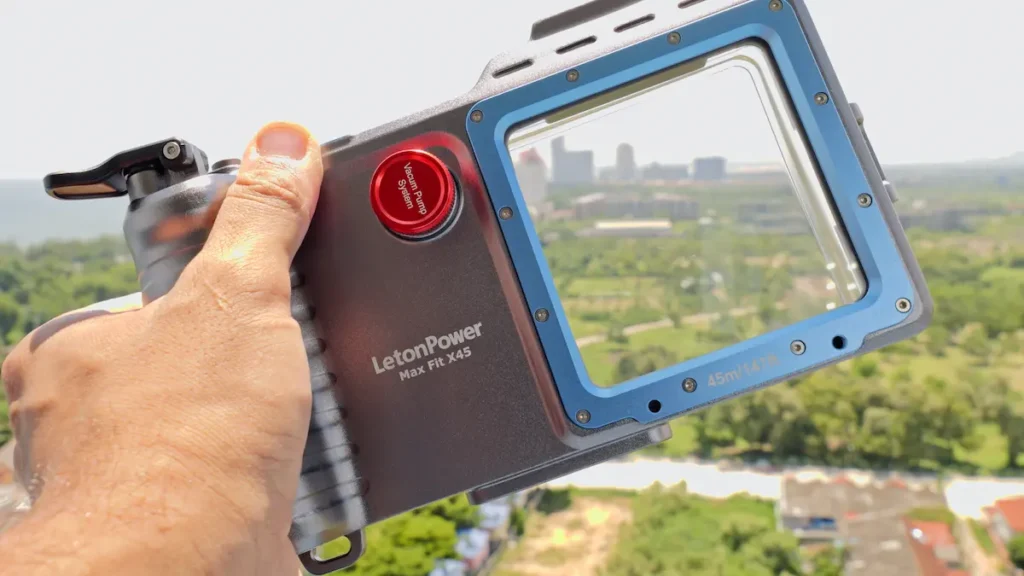
The main chassis uses CNC-machined aluminium alloy, while the rear door is made from thick transparent polycarbonate.
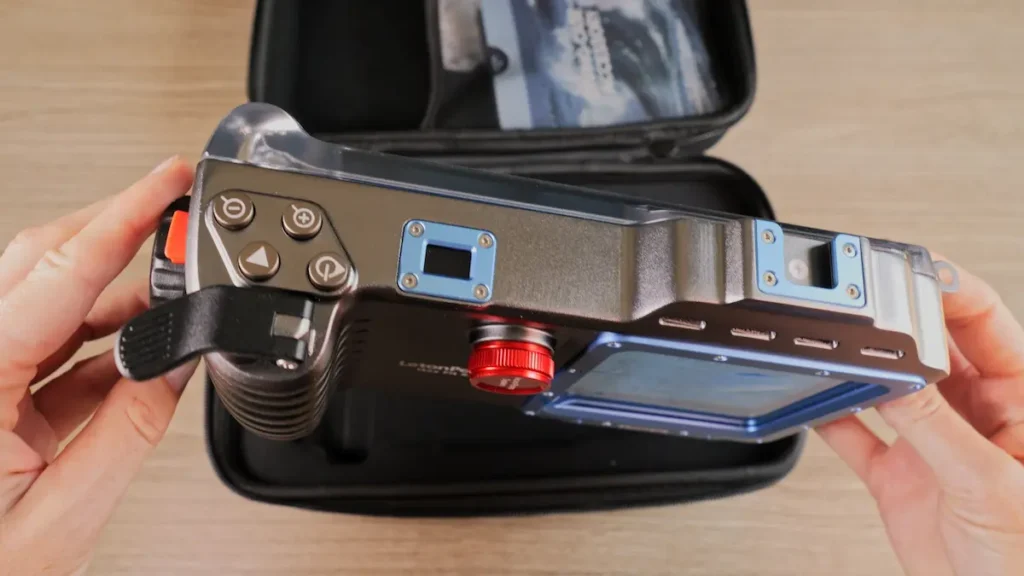
There’s a moulded grip on the right-hand side, a spring-loaded shutter button on top and a substantial locking mechanism for the rear door.
The manufacturer rates the housing to 45 metres (147 feet). That exceeds the usual recreational scuba depth limit of 40 metres, but it shouldn’t be interpreted as permission to exceed your training, certification or dive plan.
A housing’s rated depth also doesn’t guarantee that every function will work reliably at that depth or that the housing cannot flood.
We particularly liked the physical shutter button. It provides clear tactile feedback, which we expect could be useful when wearing gloves.
However, that underwater handling advantage remains an expectation rather than something we’ve verified on a dive.
The hinged rear door solves a real frustration
One of our biggest complaints about the Divevolk was getting the phone in and out of the housing.
Its narrow loading opening can be awkward, particularly when the housing is attached to a dual-handle camera tray.
With our original tray arrangement, we needed to detach the housing to remove the phone. That’s inconvenient when preparing equipment on a dive boat.
The X45 takes a different approach.
Unlock the side latch and the rear door swings open, allowing you to insert or remove your phone without dismantling the entire camera rig.
It also makes the interior camera window much easier to clean if you notice fingerprints or moisture before closing the housing.
But there’s a trade-off.
A larger opening means a longer sealing perimeter that must be inspected carefully. Hair, sand, salt deposits or damage along the seal could compromise the housing.
We appreciate the X45’s transparent door because it makes visual inspection easier, but visibility alone doesn’t prove that a seal is watertight.
Smartphone compatibility: fewer adapters, less preparation
The X45 uses an adjustable spring-loaded phone clamp rather than requiring a model-specific plastic adapter.
That could be a substantial advantage for people who change phones regularly or share a housing between compatible devices.
During our dry-land examination, we also fitted a phone with its screen protector and a slim bumper case still attached.
Both fitted without difficulty.
This was particularly appealing after our Divevolk experience, where we eventually had to remove our screen protector to restore consistent touchscreen responsiveness underwater.
Nevertheless, we’d avoid describing the X45 as compatible with every smartphone.
Phone dimensions, camera positioning, Bluetooth behaviour and supported controls all need checking against the manufacturer’s current compatibility information.
Bluetooth camera controls: simple in theory, inconsistent in practice
The X45 uses physical buttons communicating with the smartphone over Bluetooth.
The connection operates between devices enclosed within the housing; it doesn’t mean Bluetooth signals can reliably travel significant distances through seawater.
One attraction of this design is that you can use your phone’s native camera app rather than depending on a dedicated third-party application.
In our tests, Bluetooth pairing was straightforward and the shutter button worked reliably.
Unfortunately, switching between photo and video modes was inconsistent on both our Google Pixel 7 Pro and Pixel 8 Pro.
We contacted LetonPower about the issue. At the time of preparing our video, the company was investigating whether the problem related to our phones, button mapping or the particular housing unit.
That matters because reliable access to different shooting modes is fundamental to an underwater camera.
A housing might be beautifully constructed, but if you can’t confidently switch between photos and videos during a dive, the practical experience becomes frustrating.
For us, a configurable companion application could potentially improve this aspect of the X45, provided it was implemented reliably.
Until we’ve established the cause of the issue and completed underwater testing, we wouldn’t describe the X45’s control system as fully proven.
The manual vacuum pump: useful, but understand its limitations
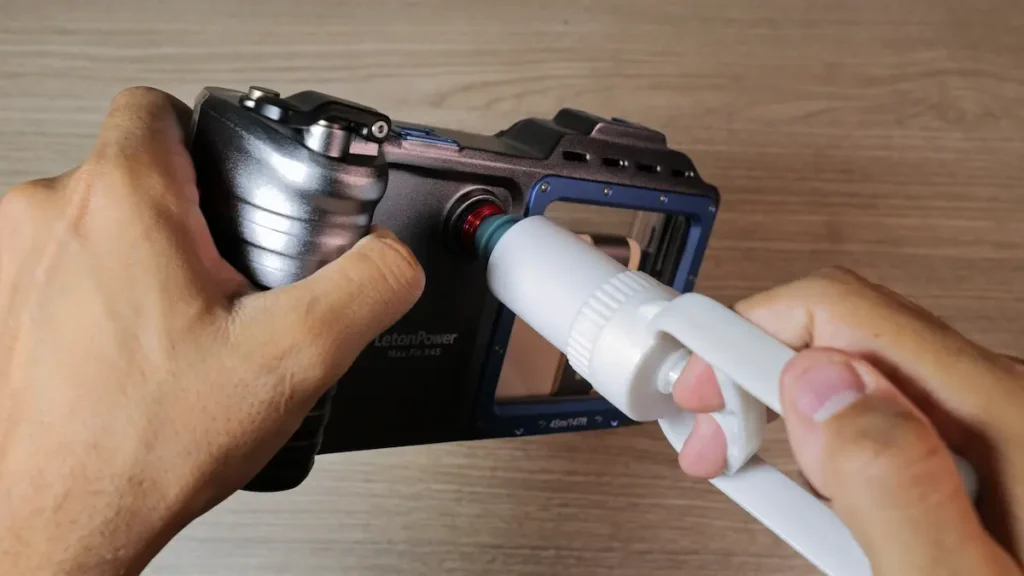
One of the X45’s most interesting features is its included manual vacuum pump.
The housing has a dedicated valve port, allowing you to remove some air from the sealed enclosure before diving.
Vacuum checking can help identify certain sealing problems before a camera is exposed to underwater pressure.
However, the X45 system we examined did not have an integrated electronic indicator confirming that a specified vacuum had been reached and maintained over time.
That’s a significant distinction.
A manual pump by itself isn’t equivalent to a monitored vacuum system with a pressure sensor and leak-status indication.
It shouldn’t be treated as proof that the housing is watertight.
We’d follow the manufacturer’s exact procedure, inspect and maintain every seal, and carry out appropriate checks before every dive.
Mounting options and wet lenses
The X45 has mounting threads underneath for attaching it to a camera tray, along with a cold-shoe mount on top for compatible accessories.
This makes it practical to build a larger filming setup with handles and underwater video lights.
Its hinged door remains accessible when mounted on our tray arrangement, which we consider a genuine ergonomic advantage.
Wet lenses are a different story.
At the time of our review, LetonPower told us that compatible optical accessories were in development, but we hadn’t established a complete range of available wet lenses for the X45.
That leaves Divevolk with an important advantage for photographers who want to add macro or wide-angle optics.
We would check the X45’s latest accessory compatibility before buying it specifically for wet-lens photography.
What we liked about the X45
-
Solid construction and reassuring physical handling.
-
Convenient rear-door access.
-
No model-specific adapter required for our test phones.
-
Worked with our screen protector and slim bumper case fitted.
-
Responsive physical shutter during dry-land testing.
-
Manual vacuum pump included.
-
Practical mounting options for a larger camera rig.
The most important limitations are the inconsistent camera-mode switching we experienced, the lack of established wet-lens compatibility in our review, and the fact that we have not yet tested the housing underwater.
Divevolk SeaTouch 4 Max Plus Review: Our Real Underwater Experience
Unlike the X45, we’ve actually taken the Divevolk SeaTouch 4 Max Plus scuba diving.
We tested it around Southwest Pinnacle, Koh Tao, comparing the smartphone setup against our familiar action camera rig.
That experience gave us a much clearer understanding of what smartphone underwater photography does well — and what can make it surprisingly inconvenient.
Full touchscreen control underwater
Divevolk’s defining feature is its flexible touchscreen membrane.
Rather than restricting you to a selection of physical buttons, it allows you to interact with much of your phone’s touchscreen interface underwater.
When properly configured, we found it responsive and intuitive.
It gave us access to camera settings, framing tools and different shooting modes in a way that felt familiar from using the phone on land.
But our first dive didn’t go entirely to plan.
We initially left our screen protector fitted, despite Divevolk’s recommendation to remove it.
Although the touchscreen appeared to function on the surface, underwater it occasionally failed to register our inputs.
We missed several shots as a result.
Removing the screen protector resolved the responsiveness problem in our subsequent use.
That’s an important practical consideration if you’re planning a multi-day dive trip and normally rely on a screen protector to keep your phone safe on land.
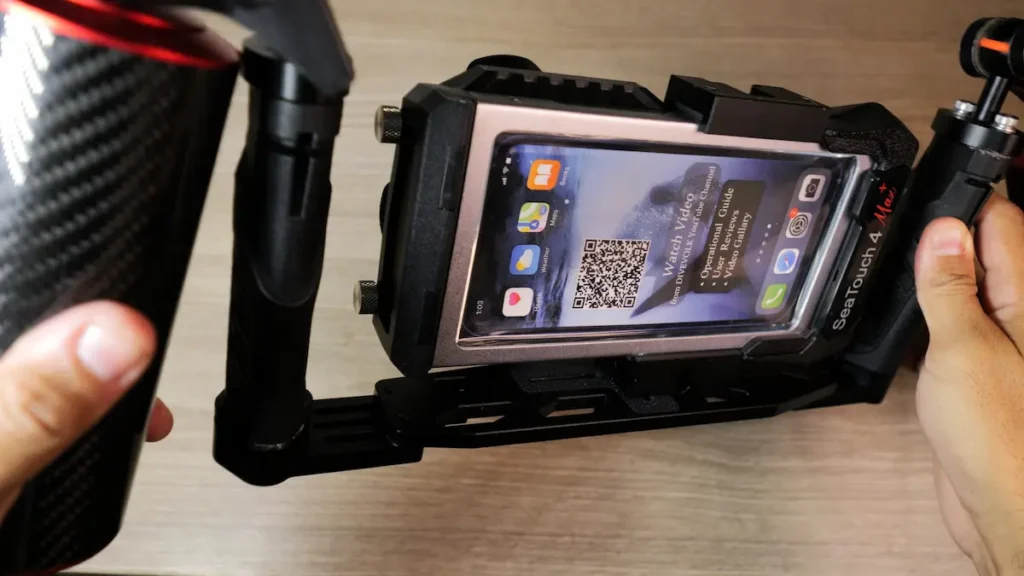
Using Blackmagic Camera for underwater filming
One of our favourite discoveries was how much flexibility a smartphone can offer when paired with a suitable camera application.
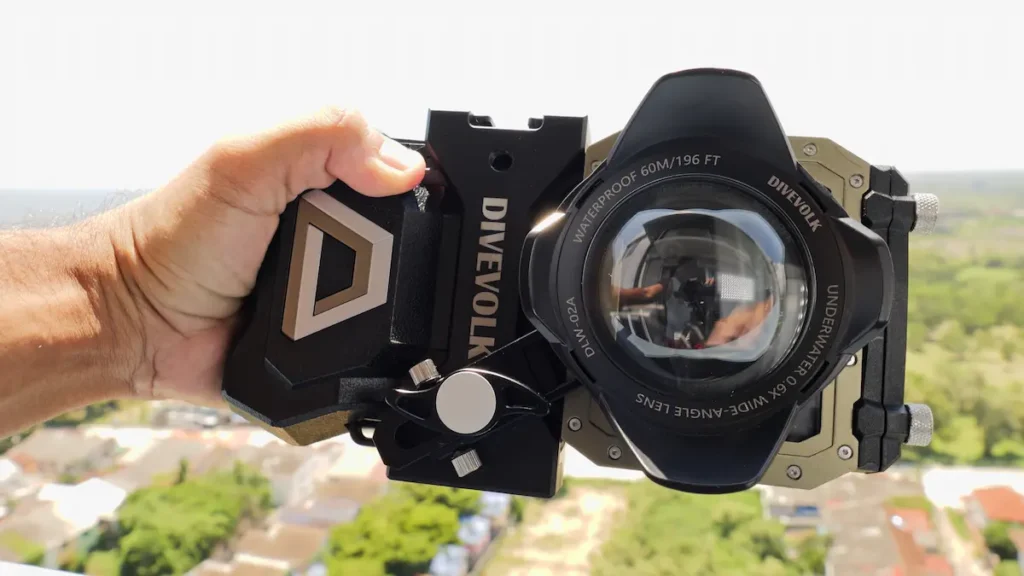
Before diving, we noticed that our phone struggled to focus properly through the wide-angle optical setup.
Using the free Blackmagic Camera application, we were able to access manual focus controls and lock focus appropriately.
That helped resolve the problem.
The application also gave us much more direct control over our camera settings, opening up creative possibilities that aren’t always available with a typical action camera workflow.
However, having so many options can also make the system more complicated.
We’d recommend becoming comfortable with your chosen camera application on land rather than learning its controls during a dive.
Battery life, overheating and fogging
Another challenge was preparing the phone before entering the water.
We needed to ensure that the screen could be activated while inside the housing.
For our test, we chose to prevent the phone from sleeping.
That solved one problem but introduced another: increased battery use and overheating warnings before entering the water.
During extended high-resolution and high-frame-rate filming, we also experienced overheating and fogging issues.
These observations reflect our particular smartphone setup and diving conditions, rather than proving that every phone will behave the same way.
Nevertheless, they affected our confidence in the system.
Our action camera was considerably simpler to prepare and more dependable during those dives.
Why we still enjoyed diving with Divevolk
Despite those frustrations, the smartphone offered several advantages.
The larger screen made framing and reviewing shots easier.
We enjoyed having access to multiple camera lenses and more creative settings.
We also found ourselves filming vertically more often than we normally would with our action camera.
For content creators, that can be particularly useful.
Footage is already on your phone, making it straightforward to review, edit and share without transferring files between devices.
And once we’d resolved the touchscreen issue, using the housing underwater felt surprisingly natural.
The Divevolk didn’t replace our action camera as our primary underwater filming setup, but it offered enough additional flexibility that we wanted to keep using it.
Divevolk’s established accessory ecosystem
Divevolk also has an advantage when it comes to expanding your underwater photography.
The SeaTouch system supports a range of accessories, including compatible wide-angle lenses, macro lenses, filters and mounting options.
That’s relevant if you want to move beyond general reef scenes and experiment with more specialised underwater photography.
However, compatibility depends on the exact housing version, smartphone, camera alignment and accessory.
We wouldn’t assume that every Divevolk lens or adapter works with every SeaTouch configuration.
Watch our real-world comparison: Action Camera vs Smartphone Underwater — Our Koh Tao Dive Test.
LetonPower X45 vs Divevolk: Which Design Makes More Sense?
The biggest difference between these housings isn’t their appearance or depth rating.
It’s how they change the experience of taking photographs underwater.
Bluetooth buttons vs full touchscreen control
The X45’s physical controls are appealing because they simplify the interaction between diver and camera.
You can feel the shutter button, operate it without locating a particular area of the touchscreen, and potentially make adjustments more easily while wearing gloves.
For someone primarily shooting photographs or short video clips, that approach could be convenient.
But physical controls are only as useful as their button mapping.
Our difficulty switching camera modes on the Pixel 7 Pro and Pixel 8 Pro demonstrates why smartphone compatibility involves more than simply fitting the phone inside the housing.
Divevolk takes the opposite approach.
Its touchscreen gives you more freedom to navigate camera applications, change settings and use familiar phone functions.
That flexibility is particularly attractive for photographers who like experimenting with manual settings.
The compromise is that touchscreen operation depends on correct phone positioning, membrane contact and preparation.
Our own dives showed how a seemingly minor detail — leaving a screen protector fitted — can affect the entire shooting experience.
Our assessment:
We prefer the tactile simplicity of the X45’s shutter and loading design, but Divevolk currently has the stronger evidence for functional underwater camera control because we’ve actually used it successfully on dives.
Build quality and materials
Both housings made positive first impressions.
The X45 feels solid, with an aluminium chassis, substantial latch and transparent rear door.
Divevolk also feels robust, although its flexible membrane and narrow phone-loading opening make it a very different design.
We wouldn’t conclude that one housing is more waterproof simply because it feels heavier or uses more metal.
Flood resistance depends on the complete design, seal condition, correct operation and manufacturing quality.
Pre-dive checks and water-ingress risk
The X45’s manual vacuum pump is an interesting feature, but we would not automatically describe it as providing superior flood protection.
Without confirmed pressure monitoring, we cannot verify from our testing how effectively the system detects a slow leak.
Divevolk’s smaller loading opening reduces the length of the main opening seal, but that alone doesn’t make it immune to flooding.
Both housings require careful preparation.
Our general approach is to inspect seals, remove contamination, check the camera window, confirm the housing is correctly closed and follow the manufacturer’s leak-checking procedure.
Whenever possible, we also prefer preparing camera equipment well before entering the water rather than rushing through checks immediately before a dive.
Wet lenses, macro and wide-angle photography
This is one area where the Divevolk system has a clearer advantage.
Its established accessory range gives photographers more options for experimenting with macro subjects, wider scenes and filters.
The X45 has mounting provisions and LetonPower told us compatible optical accessories were being developed. However, that isn’t the same as having an established, verified range available to purchase.
If you’re planning to photograph nudibranchs, tiny crustaceans or other macro subjects, lens availability should be part of your buying decision from the beginning.
If you’re mainly filming dive buddies, reefs and general underwater scenes, your phone’s existing cameras may already offer much of what you need.
Smartphone upgrades and long-term value
The X45’s adjustable clamp is appealing for people who regularly change phones.
Divevolk’s modular adapters allow it to accommodate different compatible devices, but upgrading may mean purchasing another adapter.
Neither design guarantees future compatibility with phones that haven’t been released yet.
Camera positions, phone dimensions, operating-system changes and control behaviour can all affect whether a housing remains suitable.
Before buying, we’d consider not only whether a housing works with our current phone but also whether the manufacturer supports updates and replacement components.
The true cost of an underwater smartphone setup
The housing is only the starting point.
You might also want a camera tray, handles, video lights, clamps, arms, filters, wet lenses or replacement adapters.
A relatively affordable housing can become an expensive system once everything is included.
We’d start by deciding what we actually want to photograph.
For occasional holiday footage, a simple housing may be enough.
For more ambitious underwater photography, lighting and optics can become just as important as the housing itself.
Best Underwater Phone Cases and Housings: What Else Is Available?
The X45 and SeaTouch 4 Max Plus aren’t your only options.
Underwater smartphone housings now range from basic waterproof pouches to more sophisticated systems with physical controls, dedicated applications and integrated leak-monitoring features.
Here are the main types worth understanding before choosing one.
1. Full touchscreen underwater housings
These allow you to operate a smartphone through a pressure-sensitive membrane.
Divevolk is a prominent example.
Their biggest attraction is flexibility: you’re not necessarily limited to a fixed selection of camera buttons.
However, touchscreen responsiveness, glove compatibility and phone setup can affect the experience.
2. Physical-button and Bluetooth housings
These use external controls to operate the smartphone.
The LetonPower X45 follows this approach.
Physical buttons can be easier to locate by touch, particularly when your attention is divided between buoyancy, navigation and filming.
But it’s important to confirm that the buttons work correctly with your particular phone and camera application.
3. Dedicated app-controlled smartphone housings
Some manufacturers pair their housings with applications specifically developed for underwater photography.
This can offer more predictable camera-control layouts and additional features.
The compromise is that your shooting experience may depend on the app’s compatibility, reliability and continued support.
A good housing application can be an advantage. A poorly maintained one can become a significant limitation.
4. Basic waterproof phone pouches
These are usually the cheapest option.
They’re useful for protecting a phone from splashes, rain and some shallow-water activities when used within their stated limits.
However, we wouldn’t recommend treating an ordinary waterproof pouch as an alternative to a properly rated scuba diving housing.
Increasing pressure, unreliable touchscreen access and limited camera controls can make them unsuitable for diving.
5. Dedicated underwater action cameras
An action camera isn’t an underwater phone case, but it’s an important alternative.
Compact cameras can be easier to handle, simpler to prepare and less disruptive if something goes wrong.
They also avoid exposing your everyday phone to the risk of flooding.
For many recreational divers, that simplicity may be more valuable than the additional functions of a smartphone.
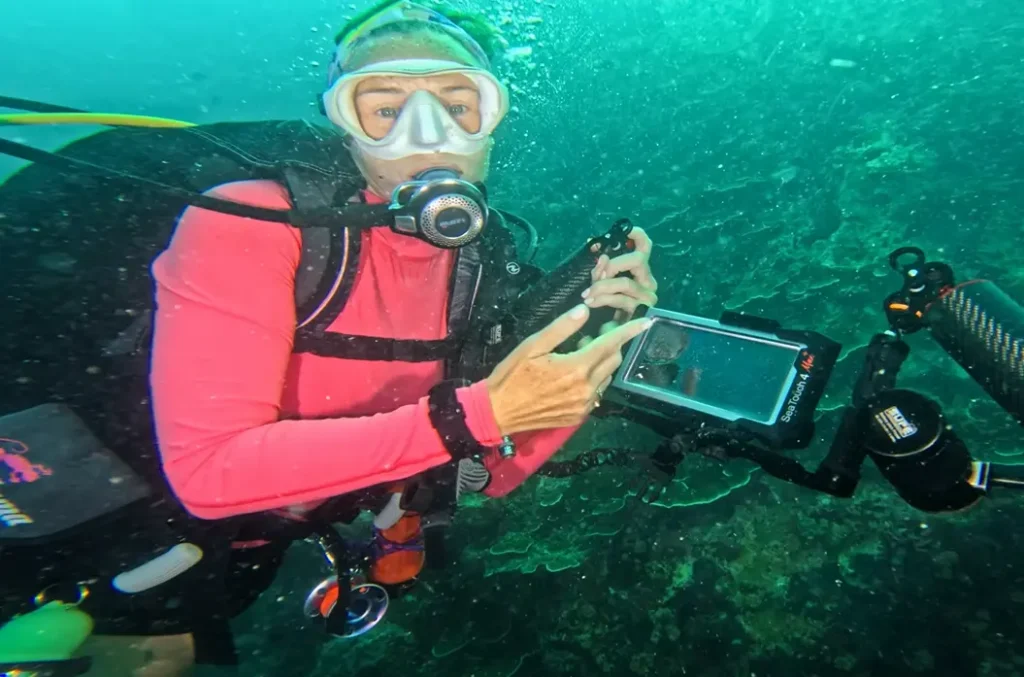
Other underwater smartphone housings worth considering
|
Product |
Control system |
Manufacturer depth rating |
Approximate listed price* |
Best suited to |
|---|---|---|---|---|
|
LetonPower X45 |
Bluetooth physical buttons |
45 m |
US$269.99 |
Divers prioritising tactile controls and convenient phone loading |
|
Divevolk SeaTouch 4 Max Plus |
Full touchscreen membrane |
60 m housing; 30 m touchscreen sensitivity |
From approximately US$191–269 depending on seller/configuration |
Creative camera control and compatible wet lenses |
|
SeaLife SportDiver S |
Bluetooth controls and dedicated app |
30 m |
Check current retailer |
Divers wanting an app-based system |
|
SeaLife SportDiver Ultra |
Bluetooth controls and dedicated app |
40 m |
Check current retailer |
Divers using larger compatible smartphones |
|
Kraken Sports KRH08 Universal V2 |
Dedicated housing control system |
Verify exact current specification |
Approximately US$375–399 |
Buyers comparing more advanced housings |
*Indicative US-dollar listings researched in October 2026, not guaranteed checkout prices. Regional taxes, packages and promotions vary. Product compatibility and accessories must be checked with the manufacturer.
An important detail with the Divevolk: its published 60-metre waterproof rating is not the same as its stated 30-metre touchscreen sensitivity rating. If you intend to use a housing at greater depths, check both the protection rating and the operating limits of its controls.
For SeaLife and Kraken systems, we’d also look carefully at app requirements, replacement parts, seal-monitoring features and supported phones rather than simply comparing prices.
The best underwater phone housing is the one that reliably supports your actual phone and intended photography — not necessarily the one with the longest feature list.
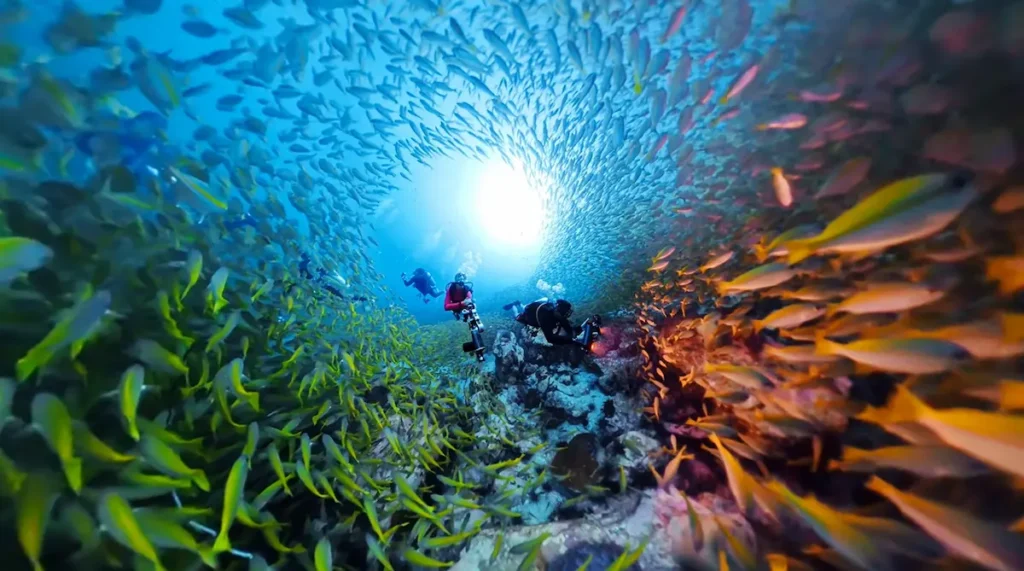
Underwater Phone Housing vs GoPro or Action Camera: Which Should You Choose?
We’ve already explored this question during a real diving comparison in Koh Tao, and our conclusion might surprise anyone expecting us to recommend the newest piece of technology.
We still preferred our action camera as our primary underwater filming system.
Not because the smartphone produced poor results.
In fact, we really enjoyed the footage and creative flexibility it offered.
The issue was reliability and preparation.
Where smartphones have an advantage
Most people already own a capable smartphone camera.
You know how to use it, you’re familiar with its interface and you can often access several camera lenses without buying a separate system.
A compatible underwater housing allows you to take advantage of those features beneath the surface.
There’s also a significant workflow benefit.
You finish your dive, remove your phone, and your photos and videos are already available for editing and sharing.
No memory-card transfers or additional devices are necessarily required.
For someone producing Instagram Reels, TikToks or short travel videos, that’s attractive.
We also enjoyed using the phone’s larger screen for framing and checking focus.
Where action cameras have an advantage
Our action camera was easier to prepare.
It had fewer setup steps, didn’t require us to remove a phone screen protector and didn’t interrupt our filming with the same issues we encountered using the smartphone.
It’s also much less disruptive to lose a dedicated camera than to flood a phone containing personal information, contacts, banking applications and travel documents.
That risk alone is worth considering.
We found that our action camera remained the more practical choice for dependable everyday underwater filming, while the smartphone offered a different set of creative opportunities.
What about image quality?
A smartphone can produce excellent underwater photographs and video, but camera specifications alone don’t determine the result.
Underwater lighting, visibility, subject distance, colour loss, lens compatibility and your shooting technique all matter.
The best camera for your next dive isn’t necessarily the one with the highest advertised resolution.
It’s the one you can operate confidently while maintaining safe diving practices.
For us, that often means a compact, familiar action camera.
For someone who primarily creates content on their phone, a smartphone housing could make more sense.
Can your smartphone be useful in a surface emergency?
Potentially, yes.
A functioning phone in a suitable waterproof housing could be useful at the surface if you have mobile reception and can operate it safely.
However, we wouldn’t consider a smartphone housing a replacement for a DSMB, whistle, appropriate emergency signalling equipment or a dedicated marine communication device where required.
Mobile coverage may be nonexistent at remote dive sites, and a flooded, damaged or discharged phone may be unusable.
It’s a possible additional communication option, not a dependable primary emergency system.
Watch our real-world test: Action Camera vs Smartphone Underwater.
What to Check Before Buying an Underwater Phone Case
Before spending money on a smartphone housing, we’d work through the following checklist.
☐ Confirm compatibility with your exact smartphone model and camera layout.
☐ Check both the housing’s depth rating and any separate control-operation limits.
☐ Understand whether the housing uses Bluetooth, touchscreen controls or a dedicated app.
☐ Check whether your screen protector or phone case needs removing.
☐ Investigate the seal-checking system and required maintenance.
☐ Verify whether compatible macro, wide-angle or other wet lenses are available.
☐ Consider how easily you can load the phone while the housing is mounted on a tray.
☐ Check battery consumption, overheating risks and phone storage capacity.
☐ Consider the financial and personal consequences of flooding your everyday phone.
☐ Practise operating the camera on land before your dive.
One final recommendation:
Don’t make the first dive with a new housing the same dive where you absolutely need to capture important footage.
Familiarise yourself with the setup, follow the manufacturer’s testing instructions and build confidence gradually.
A camera should never distract you from your buoyancy, gas supply, buddy or surroundings.
Our Verdict: LetonPower X45 or Divevolk SeaTouch 4 Max Plus?
The LetonPower X45 has made a very positive first impression.
We appreciate its solid construction, hinged rear door, adjustable phone clamp and tactile shutter button.
It addresses several practical frustrations we encountered using the Divevolk, particularly loading the phone and dealing with screen protectors.
The included manual vacuum pump is also an interesting addition, provided its limitations are properly understood.
However, the inconsistent camera-mode switching on our Google Pixel phones is something we’d want resolved before recommending the X45 as a dependable underwater filming solution.
And we still need to take it diving.
The Divevolk SeaTouch 4 Max Plus has already demonstrated its strengths underwater.
Once we’d configured our phone properly, the touchscreen was responsive, the camera controls offered considerable flexibility and we enjoyed the results.
Its established wet-lens accessories also make it attractive for divers who want to develop their underwater photography.
But it comes with compromises: a fiddly loading process, screen protector considerations, additional setup requirements and the overheating and fogging problems we experienced with our particular phone.
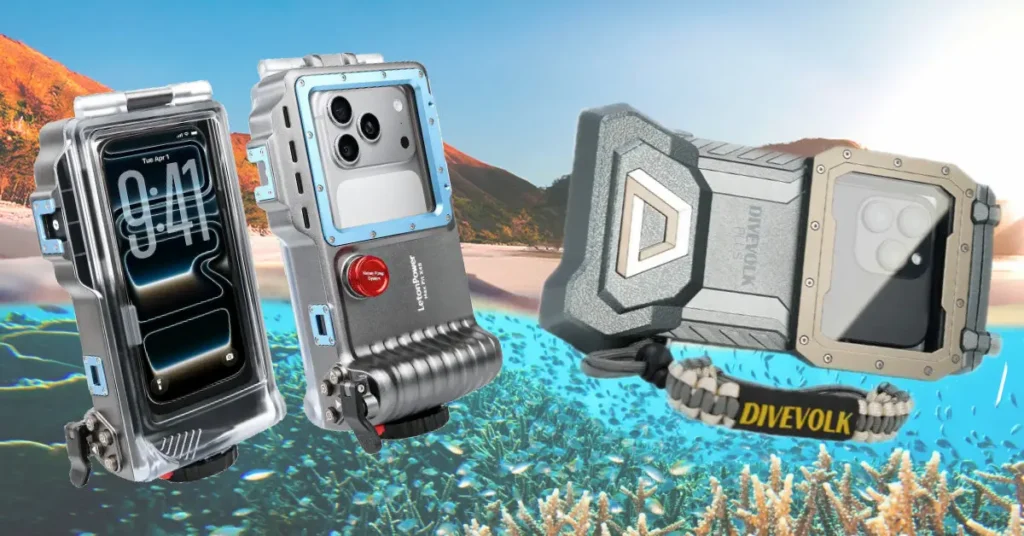
Which would we choose?
Choose Divevolk if…
You value touchscreen flexibility, want access to compatible wet lenses and are comfortable spending more time preparing your smartphone camera setup.
Consider the LetonPower X45 if…
You prefer physical controls, easier phone installation and a simpler mechanical design — provided you’ve confirmed the camera controls work with your phone and you’re comfortable with the current evidence limitations.
Stick with an action camera if…
Your priorities are straightforward setup, compact size, dependable filming and avoiding the risk of taking your everyday phone underwater.
For now, we’re not declaring an overall winner between the two smartphone housings.
We need to see how the X45 performs on actual dives before we can make that judgement.
And that’s exactly why we prefer reviewing equipment this way.
A product can look fantastic on a specification sheet and still introduce unexpected frustrations in real use.
Our goal is to help you understand those trade-offs before you spend your money.
Interested in either housing?
Both brands have provided our audience with discount codes. Check the current offers and make sure your phone is compatible before ordering.
LetonPower X45
Physical controls and easier phone access
Code: AARONCASSIE — 15% off sitewide
Divevolk SeaTouch
Touchscreen freedom and wet-lens options
Code: aaronandcassie — 6% off sitewide
Current validity and eligible products require confirmation. Affiliate links.
Frequently Asked Questions
Can you take a smartphone scuba diving?
Yes, provided you use a purpose-built underwater housing compatible with your phone and suitable for your planned diving depth. An ordinary waterproof pouch isn’t necessarily designed for scuba diving pressures. Always follow the housing manufacturer’s operating instructions and check the seals carefully before entering the water.
What is the best underwater phone case for scuba diving?
There isn’t one universal answer. Divevolk’s SeaTouch 4 Max Plus appeals to photographers who want touchscreen control and compatible wet lenses, while the LetonPower X45 offers physical controls and easier phone loading. Other options include SeaLife’s SportDiver range. The best choice depends on your smartphone, diving depth, photography needs and preferred controls.
Is Divevolk worth the money?
It can be, particularly if you already own a capable smartphone and want creative control underwater without buying a separate camera system. We enjoyed using ours on real dives, especially once we’d resolved the touchscreen issue. However, its setup requirements, loading process and potential phone-related reliability problems are worth considering.
Is the LetonPower X45 a good alternative to Divevolk?
Based on our dry-land examination, the X45 is a promising alternative. Its hinged door, adjustable phone clamp and physical shutter address several frustrations we encountered with Divevolk. However, camera-mode switching was inconsistent on our Google Pixel phones, and we haven’t yet verified the X45’s underwater performance.
How deep can the LetonPower X45 go?
LetonPower specifies a maximum housing depth rating of 45 metres (147 feet). That is a manufacturer rating rather than a depth we’ve independently tested. Always remain within your diving qualifications and planned limits, and remember that a depth rating doesn’t guarantee protection against flooding or reliable camera operation.
Does Bluetooth work underwater?
Bluetooth radio signals are strongly attenuated by water, so they aren’t suitable for reliable long-distance underwater communication. However, Bluetooth-controlled phone housings use a short connection between the controls and the smartphone inside the enclosure. This is different from attempting to transmit Bluetooth signals through metres of seawater.
Can you use an underwater phone housing with any smartphone?
Not necessarily. Some housings use adjustable clamps, while others require phone-specific adapters. Physical fit is only one consideration: camera alignment, software compatibility, Bluetooth controls and available camera functions also matter. Always check your exact smartphone model before purchasing.
Can you attach wet lenses to underwater phone housings?
Yes, many housings support compatible wide-angle, macro or other optical accessories. Divevolk has an established wet-lens range, although compatibility varies by housing and phone configuration. At the time of our X45 review, LetonPower’s compatible lens options were still being developed, so we’d verify current availability before buying.
Are underwater phone cases safer than action cameras?
Neither system is automatically safer from flooding. Protection depends on the housing design, condition, correct setup and operating limits. However, flooding a smartphone may have more serious practical consequences because your phone could contain important personal information and travel essentials. Dedicated action cameras also tend to involve fewer preparation steps.
What happens if an underwater phone housing floods?
Water ingress can damage or destroy your smartphone, potentially resulting in lost data and expensive repairs or replacement. Saltwater damage can be particularly severe. If flooding occurs, prioritise your safety and follow the housing and phone manufacturers’ guidance once you’re safely out of the water. Never compromise your ascent or dive safety to rescue a camera.