Underwater Video Lights: How to Choose, Set Up & Use Them
Ever wondered why your underwater footage looks beautifully colourful in your head, but disappointingly blue, green or grainy when you watch it back?
You’re not alone.
One of the biggest improvements you can make to your underwater videos isn’t necessarily upgrading your camera. It’s learning how to use underwater video lights properly.
But there’s a catch.
Buy the wrong lights, position them badly or use them without understanding your camera settings, and you could end up with washed-out subjects, distracting backscatter and an unnecessarily complicated dive.
After years of filming underwater with everything from compact action cameras to larger camera rigs, we’ve learned that good lighting is about far more than brightness.
In this guide, we’re sharing the underwater lighting equipment we actually use, why we’ve recently switched our main setup from SUPE to LetonPower, and nine practical tips to help you capture cleaner, more colourful and cinematic underwater footage.
We’ll also explain how to minimise backscatter, choose between one or two lights, balance your camera rig and film responsibly around marine life.
Transparency note: LetonPower provided us with a pair of Sealion L24 video lights to try, with no obligation to publish a review, promote the products or provide a positive endorsement. We purchased our SUPE PV52T lights ourselves and have used them for several years. All opinions are our own, based on our experience filming underwater. This article contains affiliate links, which means we may earn a commission from qualifying purchases at no additional cost to you.
Watch: Our Complete Underwater Video Lighting Guide
Prefer to see everything in action?
In our video, we show you the underwater lighting systems we’ve used, explain how we position our lights to minimise backscatter, share our action camera settings and demonstrate techniques for capturing more colourful underwater footage.
Why Do You Need Underwater Video Lights?
The first thing to understand is that underwater lighting isn’t simply about making a dark scene brighter.
It’s about restoring colour, improving image quality and controlling how your subject looks on camera.
Water absorbs colour
Sunlight contains different wavelengths of light, but they don’t all travel through water equally.
Red wavelengths disappear relatively quickly, followed by oranges and yellows as you descend. Blues and greens penetrate farther, which is why deeper underwater footage often takes on a strong blue or green appearance.
The exact effect depends on depth, water clarity, sunlight and the distance between your camera and subject.
In bright, shallow conditions, natural light can still produce beautiful footage. You might even benefit from a correctly matched red filter when filming with ambient light.
But as you descend, move into shadow or start filming subjects with little available light, a filter can only do so much.
A red filter doesn’t replace missing light. It reduces certain wavelengths to help balance the colours that remain.
An underwater video light does something different: it provides its own illumination, allowing your camera to record colours and details that would otherwise be difficult to capture.
Better lighting can mean cleaner footage
There’s another major benefit, especially for action cameras.
When available light decreases, your camera may increase its ISO to maintain exposure. Higher ISO settings can introduce visible noise and reduce image quality, particularly on cameras with smaller sensors.
Adding light to a nearby subject can help your camera use a lower ISO and preserve more detail.
That doesn’t guarantee perfectly noise-free footage, but it can make a noticeable difference to the final result.
Our advice: Before investing in a more expensive camera because your underwater videos look grainy, consider whether your existing camera simply needs better lighting.
1. How Many Lumens Do You Need for Underwater Video?
When shopping for underwater video lights, the first specification you’ll probably notice is lumens.
Lumens describe the total amount of visible light a source produces.
Generally, higher output gives you more lighting potential. But lumens alone won’t tell you how bright or evenly illuminated your subject will appear.
Beam angle, light distribution, distance and water conditions are equally important.
Underwater video light brightness guide
| Type of filming | Suggested starting point | What to consider |
|---|---|---|
| Close-up macro subjects | Around 2,000–3,000 lumens | A compact light can work well at close range |
| General action camera filming | Around 3,000–6,000 lumens | Useful flexibility for fish, coral and medium-sized subjects |
| Wider reef scenes | Around 5,000+ lumens per light | Two wide, even beams can improve coverage |
| Larger or more demanding productions | Higher-output systems | Beam quality, colour rendering and positioning become increasingly important |
These are practical starting points, not strict minimum requirements. Effective brightness varies considerably between lighting systems and shooting conditions.
We’ve also tried out smaller OrcaTorch video lights rated at approximately 2,300 lumens. They’re compact, convenient to travel with and perfectly capable of illuminating small subjects at close range or in dark environments like night dives and wrecks.
They can also serve as useful backup dive lights where their specifications and intended use permit.
But when you’re trying to illuminate a wider reef scene, that level of output becomes limiting.
That’s why we prefer more powerful lights for our main underwater video setup.
Why more lumens don’t always mean brighter-looking footage
Imagine two video lights.
One produces a concentrated beam that looks very bright in the centre but leaves the edges of your composition relatively dark.
The other distributes its output across a wider area, producing a more balanced scene without such an obvious hotspot.
Even if the second light has a higher advertised lumen rating, it might not appear dramatically brighter when you compare the centre of the beams.
Instead, its advantage could be the amount of usable light spread across your composition.
This is particularly relevant to our experience comparing the 5,000-lumen SUPE PV52T with the 12,000-lumen LetonPower Sealion L24.
The takeaway: Don’t buy underwater video lights based on lumen output alone. Look at beam quality, coverage, colour rendering and how they perform with the type of footage you want to capture.
Why more lumens don’t always mean brighter-looking footage
Imagine two video lights.
One produces a concentrated beam that looks very bright in the centre but leaves the edges of your composition relatively dark.
The other distributes its output across a wider area, producing a more balanced scene without such an obvious hotspot.
Even if the second light has a higher advertised lumen rating, it might not appear dramatically brighter when you compare the centre of the beams.
Instead, its advantage could be the amount of usable light spread across your composition.
This is particularly relevant to our experience with SUPE and LetonPower, which we’ll discuss shortly.
The takeaway: Don’t buy underwater video lights based on lumen output alone. Look at beam quality, coverage, colour rendering and how they perform with the type of footage you want to capture.
Do You Need One Underwater Video Light or Two?
This is one of the most common questions divers ask when building their first camera rig.
And the answer depends largely on what you’re filming.
When one video light is enough
If you’re primarily interested in macro subjects, small reef creatures or relatively tight compositions, one good-quality video light can be a sensible starting point.
You can position it close to your subject and adjust its angle to control shadows.
A single light also means less equipment, less weight, fewer batteries and a lower initial investment.
For someone experimenting with underwater videography for the first time, that’s a genuine advantage.
Why we prefer two lights for wide-angle filming
When filming wider subjects, two lights offer much more flexibility.
You can position them on either side of your camera, creating overlapping areas of illumination and reducing the uneven lighting that can occur with a single source.
We also find that a symmetrical dual-light rig feels more balanced in our hands.
This makes it easier to maintain consistent framing while swimming, although good buoyancy and camera technique are still essential.
Two lights don’t automatically guarantee better footage, and they won’t illuminate an entire reef wall several metres away.
But for the kind of underwater video we enjoy shooting, a dual-light setup is our preferred choice.
Our recommendation: Start with one quality light if your budget is limited and you’re mainly filming close-up subjects. Consider two lights when you want more even coverage for wider compositions.
3. Can You Use a Normal Dive Torch for Underwater Video?
Technically, yes. But a conventional dive torch isn’t always well suited to filming.
Many dive torches are designed to project a concentrated beam into the distance.
That’s useful for navigation, signalling and spotting subjects in darker environments.
Unfortunately, that narrow beam can create a bright hotspot in the centre of your footage, surrounded by noticeably darker areas.
Dedicated underwater video lights usually use a much wider flood beam, designed to distribute illumination more evenly.
Depending on the model, this might be around 100–120 degrees, although beam specifications and measurement methods vary.
Dive torch vs underwater video light
| Feature | Conventional spot dive torch | Wide-beam video light |
|---|---|---|
| Primary purpose | Navigation and spotting subjects | Even illumination for filming |
| Beam | Usually concentrated | Broad flood |
| On-camera result | May create a central hotspot | More balanced coverage |
| Best use | Looking into crevices, signalling, navigation | Video and close-range lighting |
| Limitations | Often too narrow for wide footage | Less useful for long-distance spotting |
Some modern dive lights offer both spot and flood modes, so the distinction isn’t always absolute.
However, if your main objective is better underwater video, we’d prioritise a light with a genuinely wide, even beam.
4. SUPE PV52T vs LetonPower Sealion L24: The Video Lights We Actually Use
We’ve used several underwater lighting systems over the years, and each has served a different purpose.
Our smaller OrcaTorch lights are convenient for travelling light and filming close-up subjects.
For our more substantial camera rig, we invested in a pair of SUPE PV52T video lights several years ago.
They’ve served us well.
We’ve captured plenty of underwater footage with them, and we’re certainly not suggesting they’re suddenly inadequate because we’ve started using something newer.
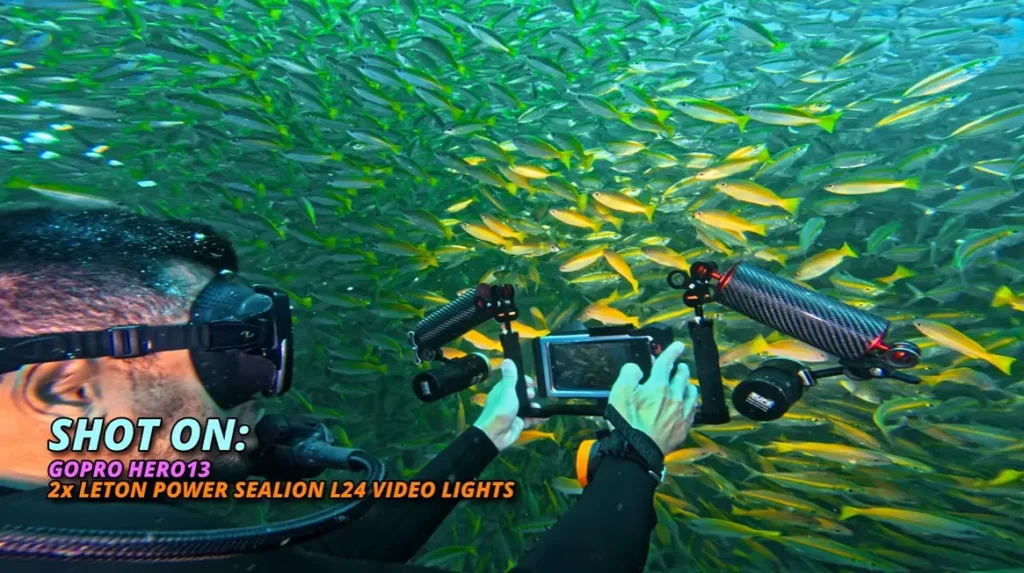
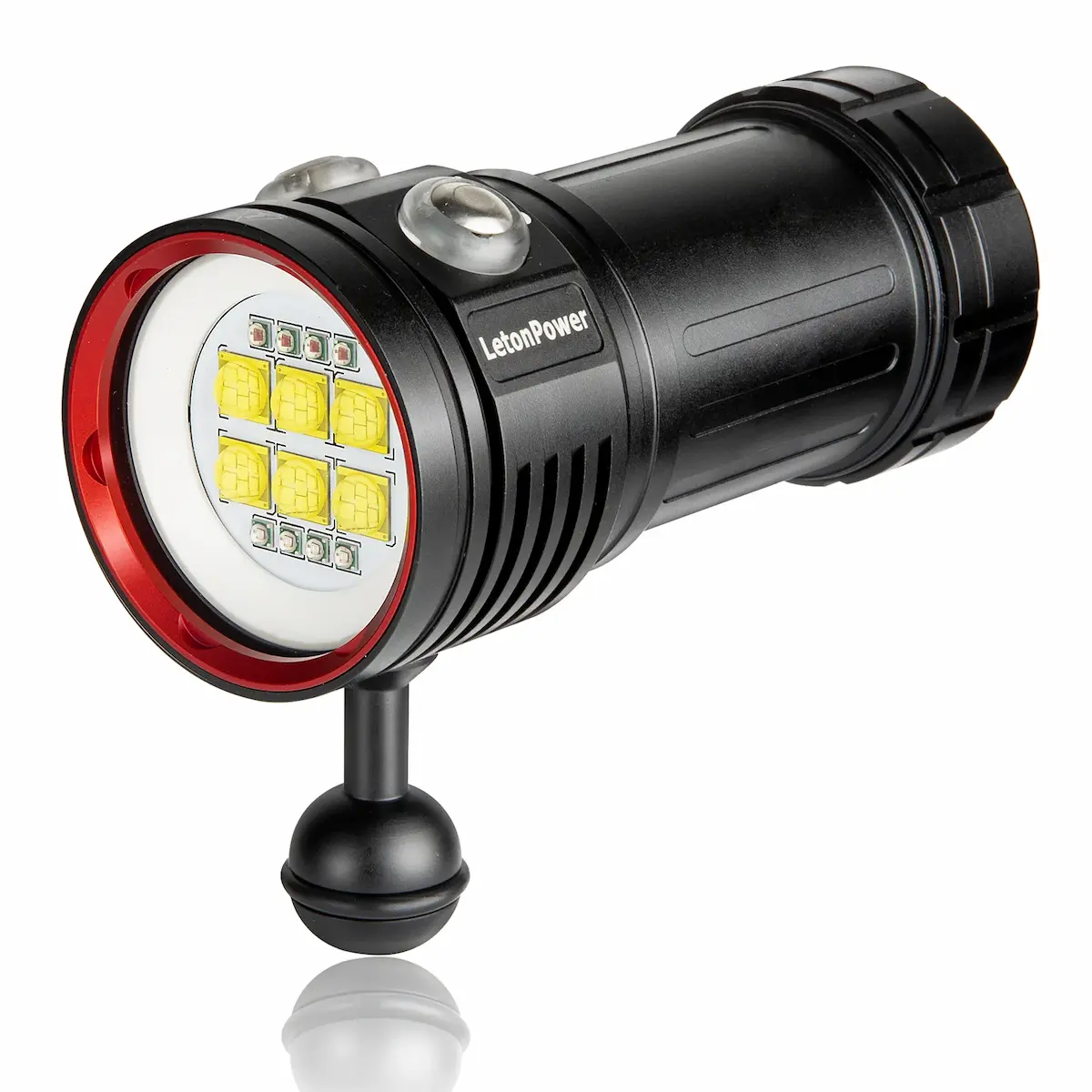
More recently, LetonPower sent us a pair of their Sealion L24 underwater video lights to try.
After using them underwater, we’ve started favouring them for our main filming setup.
But perhaps not for the reason you’d expect.
SUPE PV52T vs LetonPower Sealion L24 specifications
Here are the key published specifications for the two models.
| Specification | SUPE PV52T | LetonPower Sealion L24 |
|---|---|---|
| Advertised maximum white-light output | 5,000 lumens | 12,000 lumens |
| Advertised beam angle | 100° | 120° |
| Published colour temperature | 5,600 K | Approximately 5,500–6,500 K |
| Published CRI | 83 | 90 |
| Battery system | Dedicated rechargeable battery pack | Replaceable rechargeable battery pack |
| Charging | Dedicated charger | USB-C |
| Published maximum-output runtime | Approximately 60 minutes | Approximately 70 minutes |
| Our experience | Used for several years | More recent addition to our main rig |
Specifications are manufacturer-published figures, not measurements we have independently verified. Actual performance depends on operating conditions and settings.
The numbers help explain why the LetonPower lights might produce different results, but they don’t tell the whole story.
What we prefer about the LetonPower Sealion L24
The biggest difference we’ve noticed isn’t an enormous increase in apparent brightness.
Despite the higher advertised lumen output, the Sealion L24 lights don’t look dramatically brighter to us in the way you might imagine from the specifications.
Instead, we prefer their colour profile and the slightly wider, more balanced beam coverage they produce in our footage.
The illumination feels more evenly distributed across our compositions, particularly when we’re filming wider scenes.
The published beam angles are consistent with that observation: LetonPower specifies 120° for the Sealion L24, compared with 100° for the SUPE PV52T.
But beam angle alone doesn’t establish how evenly a light performs across its entire coverage area.
Similarly, LetonPower publishes a higher colour rendering index for the Sealion L24, but we haven’t conducted controlled colour accuracy tests.
Our preference is based on what we’ve seen in the footage we’ve captured.
The additional output may contribute to the broader coverage, but without controlled measurements we wouldn’t claim to know precisely how much of the difference comes from lumen output, optics or other aspects of the lights’ design.
What matters to us is the result we see underwater.
See the difference in our underwater footage
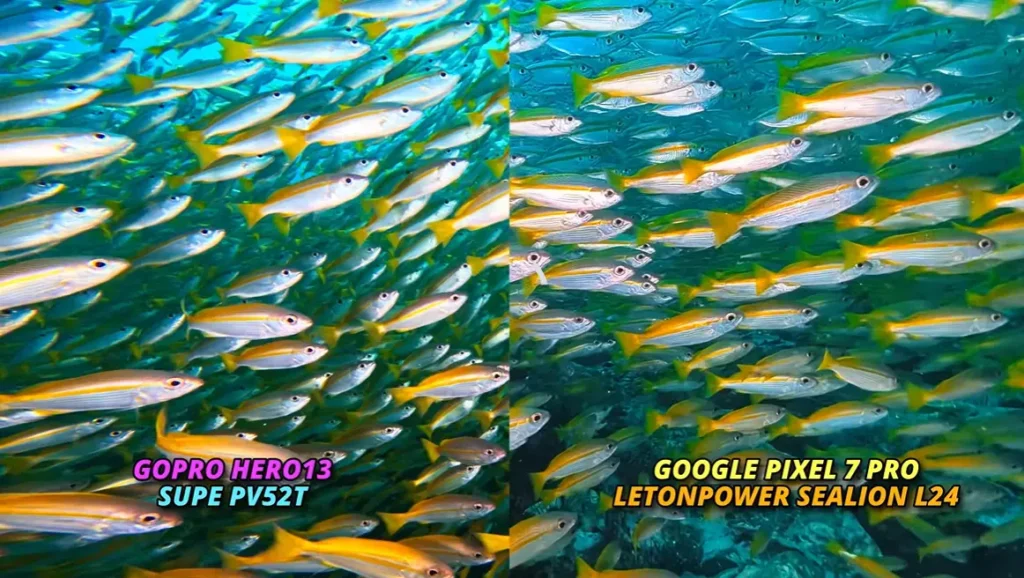
Rather than relying entirely on the manufacturers’ specifications, we’ve also compared the SUPE PV52T and LetonPower Sealion L24 using footage captured underwater.
You can see the difference in our Action Camera vs Smartphone Underwater video, where we show how the two lighting systems render colour and illuminate the scene.
For us, the most noticeable difference isn’t simply brightness. It’s the overall distribution of light and the colour profile — both of which contribute to the look we prefer from the Sealion L24.
These are real-world filming comparisons rather than controlled laboratory tests, but they offer a useful visual reference if you’re deciding whether a lighting upgrade would benefit your own underwater footage.
What we still like about the SUPE PV52T
Our SUPE PV52T lights remain capable pieces of equipment.
We bought them ourselves, we’ve used them for years, and there’s nothing fundamentally wrong with their performance.
Their published 5,000-lumen output and 100° beam are still useful specifications for underwater video.
They also offer multiple lighting modes, including a wide white beam.
If we were already getting exactly the results we wanted from them, we wouldn’t consider an upgrade essential.
The LetonPower lights are simply our current preference for the type of filming we’re doing.
Charging and batteries matter too
One of the less glamorous things to consider when buying underwater video lights is how you’re going to keep them charged.
It’s particularly important if you regularly do two or three dives a day, travel with limited luggage or spend time on liveaboards.
Our SUPE PV52T lights use dedicated rechargeable battery packs and charging equipment.
The batteries can be replaced, so this isn’t a case of needing to replace the entire light when a battery reaches the end of its useful life.
However, the dedicated charging system is less convenient for our travel setup.
By comparison, the LetonPower Sealion L24 offers USB-C charging and a replaceable battery system.
We appreciate that flexibility when we’re travelling.
Being able to charge without carrying another dedicated wall charger, or change a battery between dives when necessary, can make a real difference to your workflow.
LetonPower advertises approximately 70 minutes of runtime at its highest output, with longer runtimes at lower settings.
We’ve found the lights convenient for multiple-dive days, but runtime will always depend on how you use them.
A practical note: Always check your remaining battery capacity and charging requirements before each dive. Don’t assume a manufacturer’s maximum runtime applies to your particular settings or dive duration.
Our verdict: Is the Sealion L24 better than the SUPE PV52T?
For our current underwater filming setup, we prefer the LetonPower Sealion L24.
Not because we think the SUPE PV52T is a bad light, and not simply because the LetonPower has a higher lumen rating.
We prefer the overall appearance of the illumination, particularly its colour profile and more balanced coverage across wider compositions.
We also appreciate the charging convenience.
But we’d encourage you to think about your actual needs before spending money.
If you mainly film tiny subjects at close range, a smaller and less expensive light might be perfectly adequate.
And if you already own a capable lighting system you’re happy with, upgrading isn’t automatically necessary.
Interested in the LetonPower Sealion L24?
Explore LetonPower underwater video lights through our affiliate link.
code: aaroncassie
We have a 15% affiliate discount available for our audience. Check the current offer and eligible products before ordering, as availability and promotional terms may change.
LetonPower supplied our Sealion L24 lights for testing. We may earn a commission on qualifying purchases through our affiliate link, at no additional cost to you.
Our lighting comparison
| What matters to us | Our SUPE lights | Our LetonPower lights |
|---|---|---|
| Ownership | Purchased ourselves | Provided by LetonPower to test |
| Experience | Several years of use | More recent use |
| Image quality | Have produced footage we’re very happy with | Currently preferred colour profile |
| Beam coverage | Capable, but less even in our experience | Slightly wider and more balanced |
| Perceived brightness | Still effective | Not dramatically brighter to our eyes |
| Charging | Dedicated charging system | USB-C on our model |
| Batteries | Integrated system on our model | Replaceable on our model |
| Our verdict | Still a good system | Our current preference for wider filming |
This is a comparison of the specific lights we own, not a laboratory test or a verdict on every product made by either brand.
Are LetonPower underwater video lights worth considering?
Based on our experience, yes — particularly if you’re building a dual-light setup and value even coverage, convenient charging and a colour profile that works well for your footage.
But we’d encourage you to think about your actual needs before spending money.
If you mainly film tiny subjects at close range, a smaller and less expensive light might be perfectly adequate.
And if you already own a capable lighting system you’re happy with, upgrading isn’t automatically necessary.
→ Explore the LetonPower underwater lighting range
LetonPower supplied our lights for testing. Purchases through our affiliate link may earn us a commission at no extra cost to you.
5. How to Build a Balanced Underwater Video Lighting Setup
Once you’ve chosen your lights, you need to mount them properly.
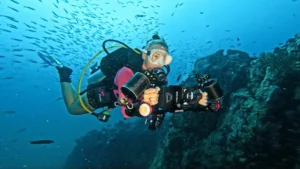
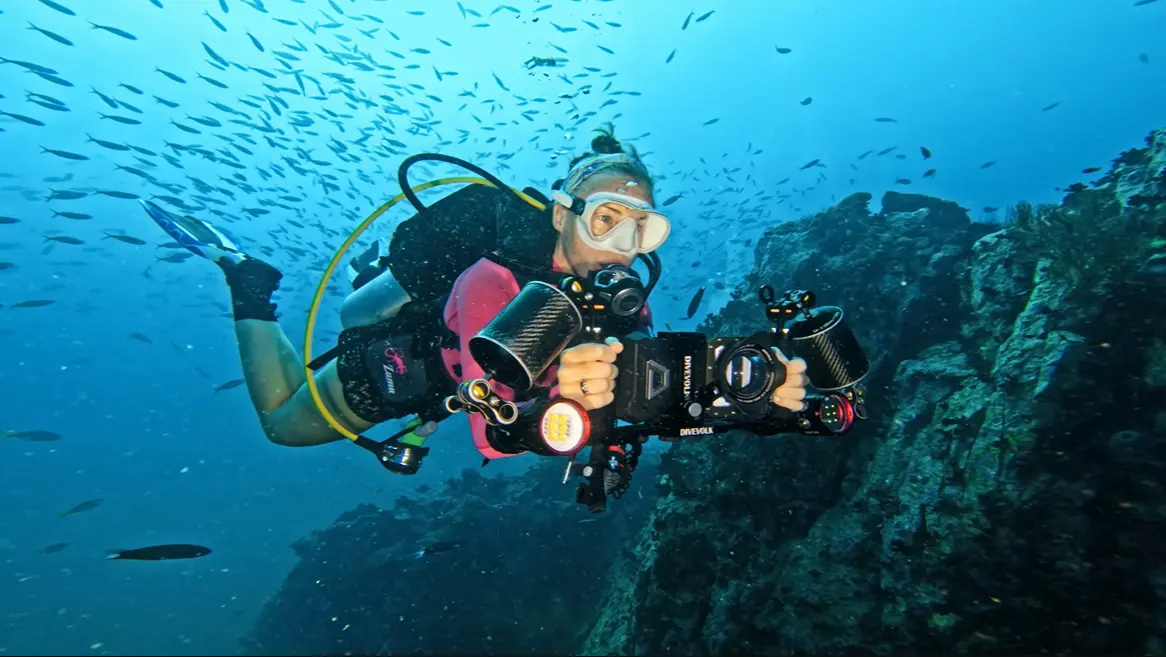
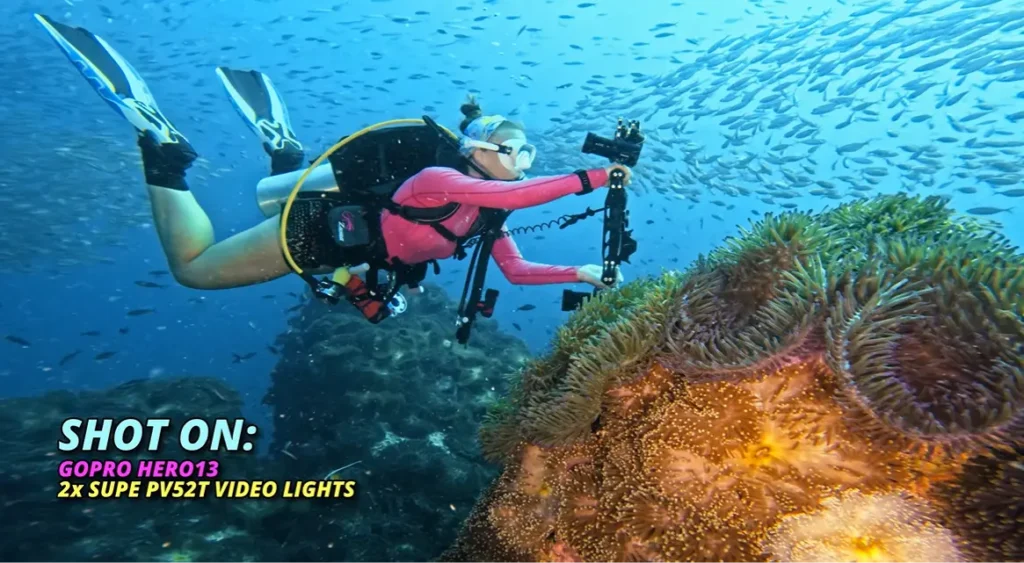
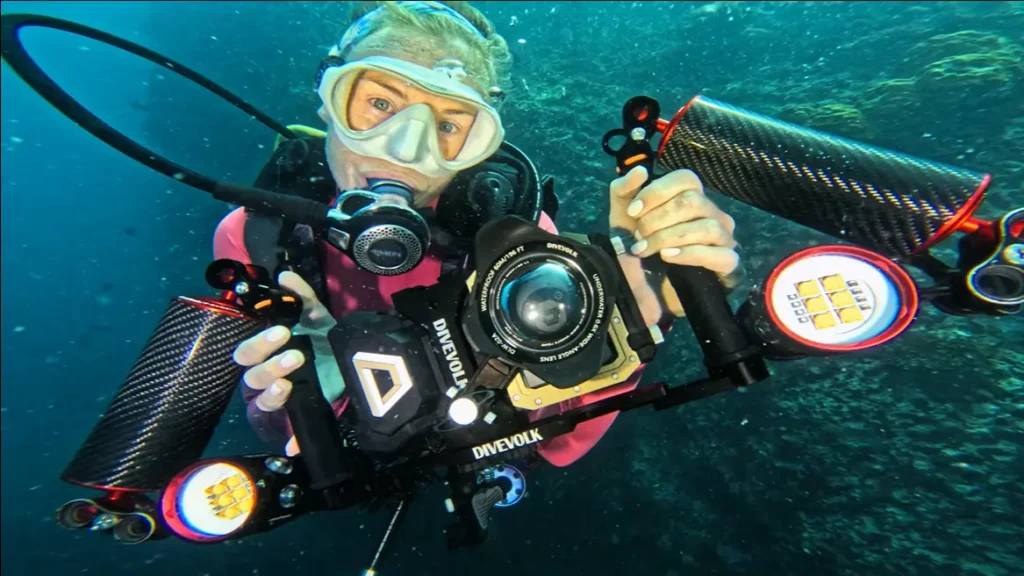
For our main filming rig, we use a dual-handle camera tray with adjustable arms and clamps.
This gives us a stable two-handed grip and allows us to position the lights independently.
But adding two powerful lights, metal arms and mounting hardware introduces another problem: weight.
Why float arms are worth considering
A camera rig that feels manageable on land can become awkward underwater if it’s excessively negatively buoyant.
Holding a heavy setup throughout a dive can increase fatigue and make filming less enjoyable.
It can also distract you from maintaining good buoyancy and awareness.
We use float arms to help offset the negative buoyancy of our camera equipment.
Depending on the lighting configuration, we swap between arms providing approximately 350 g and 500 g of lift.
Our aim is a comfortably balanced rig that’s close to neutrally buoyant in the water.
The exact configuration you need will depend on your camera housing, tray, lights, arms and accessories.
Our basic underwater camera setup
Action camera or underwater camera housing
Dual-handle tray
Two adjustable lighting arms
Compatible clamps and mounts
One or two underwater video lights
Float arms appropriate to the rig’s underwater weight
Secured batteries and accessories
Suitable equipment retention or tethering where appropriate
Important: Test a new setup in controlled, shallow conditions before taking it into strong currents, deeper water or demanding dive environments.
You want to understand how your camera rig behaves before you need to manage it alongside other diving challenges.
6. How to Position Underwater Video Lights and Reduce Backscatter
If you’ve ever watched your underwater footage and noticed dozens of little white specks floating across the screen, you’ve probably encountered backscatter.
It’s one of the most frustrating problems in underwater photography and videography.
And simply buying brighter lights won’t solve it.
What causes underwater backscatter?
Even apparently clear water contains suspended particles.
These might include plankton, sediment or other tiny material.
When your lights illuminate particles between your camera and subject, some of that light reflects towards the lens.
The result is a distracting collection of bright spots that can make otherwise beautiful footage look messy.
The lighting position we use
A common mistake is pointing both video lights straight ahead, close to the camera housing.
That can illuminate the water immediately in front of the lens — exactly where you don’t want unnecessary reflections.
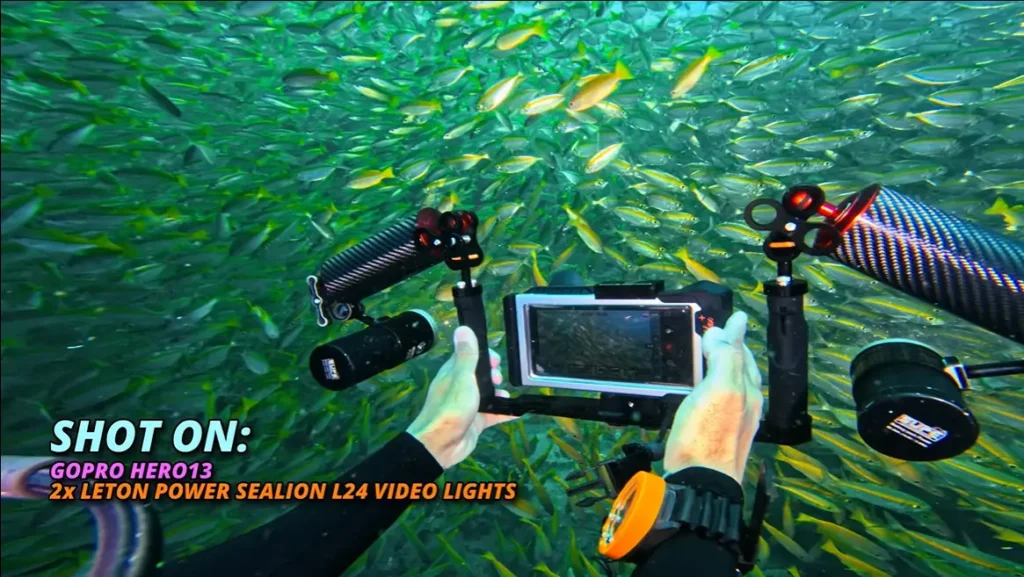
Instead, we extend our lights away from the camera using adjustable arms.
We then angle the light heads slightly outwards, allowing the softer edges of their beams to illuminate the subject without directing the brightest part of each beam straight through the centre of the water column.
The ideal position depends on your subject distance, lens angle and water conditions.
For very close subjects, you may need to bring the lights inward and change their angle.
For wider scenes, extending them farther apart can help improve coverage and reduce backscatter.
Our quick backscatter checklist
Move your lights farther away from the lens.
Avoid pointing the brightest part of each beam directly through the water in front of your camera.
Adjust the lights for your subject distance.
Get closer to your subject when it’s safe and appropriate.
Avoid stirring up sand or sediment with your fins.
Review a short test clip before committing to a long sequence.
Once we’ve found a position that works for the type of shot we’re filming, we generally leave the lights there until we change subject distance or composition.
There’s no need to spend an entire dive constantly adjusting your rig.
Our quick backscatter checklist
Move your lights farther away from the lens.
Avoid pointing the brightest part of each beam directly through the water in front of your camera.
Adjust the lights for your subject distance.
Get closer to your subject when it’s safe and appropriate.
Avoid stirring up sand or sediment with your fins.
Review a short test clip before committing to a long sequence.
Once we’ve found a position that works for the type of shot we’re filming, we generally leave the lights there until we change subject distance or composition.
There’s no need to spend an entire dive constantly adjusting your rig.
Save 15% on LetonPower underwater camera equipment
If you’re putting together an underwater photography or videography setup, LetonPower offers more than just video lights.
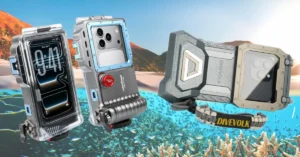
We’ve been using their Sealion L24 lights on our main underwater camera rig, and we’ve also recently featured their underwater smartphone housing in a separate video.
We haven’t yet tested the smartphone housing underwater, so we’re not in a position to recommend its real-world underwater performance. However, it’s another option worth researching if you’re considering filming with your phone rather than a dedicated action camera.
Our audience can get 15% off sitewide at LetonPower.
Explore LetonPower underwater lights, smartphone housings and accessories — 15% discount
Affiliate disclosure: We may earn a commission from qualifying purchases through our link, at no additional cost to you. LetonPower provided the Sealion L24 lights for testing. Product availability and promotional terms may change.
Our audience can get 15% off sitewide at LetonPower.
Explore LetonPower underwater lights, smartphone housings and accessories.
7. Our Action Camera Settings for Underwater Video Lights
Your lighting setup and camera settings need to work together.
These are the settings we commonly use when filming with action cameras underwater.
They’re a starting point based on our workflow, not universal settings for every camera or dive.
Remove your red filter when using white video lights
If you’ve been filming with natural light and a red filter, remember to remove it when switching to artificial white lighting.
Red filters are designed to compensate for the loss of red wavelengths in ambient underwater light.
When your subject is already being illuminated by a white video light, leaving the filter in place can introduce an excessive red cast and reduce the light reaching your sensor.
Set a consistent white balance
One of the most frustrating problems when editing underwater video is colour shifting between shots — or even during the same clip.
Automatic white balance can change as your camera moves between blue ambient light and warmer artificially lit subjects.
For more predictable results, we prefer using a fixed white balance when the conditions allow.
If our lights are rated around 5,500 K, we sometimes start with a camera white balance around 5,800–6,000 K.
We like the slightly warmer foreground this can create against a cooler blue background.
However, the right setting depends on your camera, light spectrum, depth and ambient conditions.
The Sealion L24’s published white-light colour temperature spans approximately 5,500–6,500 K, so don’t assume a single camera setting will produce identical results with every light or operating mode.
Treat these values as a creative starting point and check the results on your own camera.
Resolution and frame rate
Our usual action camera setting is 4K at 60 frames per second.
That gives us the option to slow footage down to half speed on a 30 fps editing timeline.
It’s particularly useful for smoothing out gentle camera movements and creating a more relaxed cinematic feel.
However, 60 fps isn’t always the best choice in low light.
Higher frame rates generally require shorter exposure times, which can make footage darker or force your camera to increase ISO.
When light is limited, 4K at 30 fps may produce a cleaner result.
ISO
We aim to keep ISO as low as practical.
On some action cameras, we use an upper ISO limit of 1,600 to avoid the camera pushing sensitivity excessively high.
That said, there’s no universal ISO limit that works equally well across every model.
It’s worth testing your own camera to see where noise becomes distracting.
Shutter speed
For a straightforward point-and-shoot workflow, we often leave shutter speed on automatic.
That gives the camera flexibility as we move between bright and shaded areas underwater.
If you’re aiming for consistent cinematic motion blur, manual shutter control may offer more predictable results, provided you have enough light and can manage changing exposure.
Sharpness and bitrate
We generally prefer low or medium in-camera sharpness and the highest practical recording bitrate available.
This gives us a more flexible starting point when editing.
But remember: settings can’t compensate for poor lighting, unstable camera movement or excessive distance from your subject.
Our underwater action camera settings at a glance
| Setting | Our usual starting point |
|---|---|
| Resolution | 4K |
| Frame rate | 60 fps |
| White balance | Fixed, often around 5,800–6,000 K with suitable lights |
| ISO | As low as practical; sometimes capped at 1,600 |
| Shutter | Auto for a simple workflow |
| Sharpness | Low or medium |
| Bitrate | Highest practical option |
| Red filter | Removed when using white video lights |
8. How to Capture More Cinematic Underwater Footage With Video Lights
Now for the fun part.
You’ve chosen your lights, balanced your rig and dialled in your camera settings.
How do you actually make your footage look better?
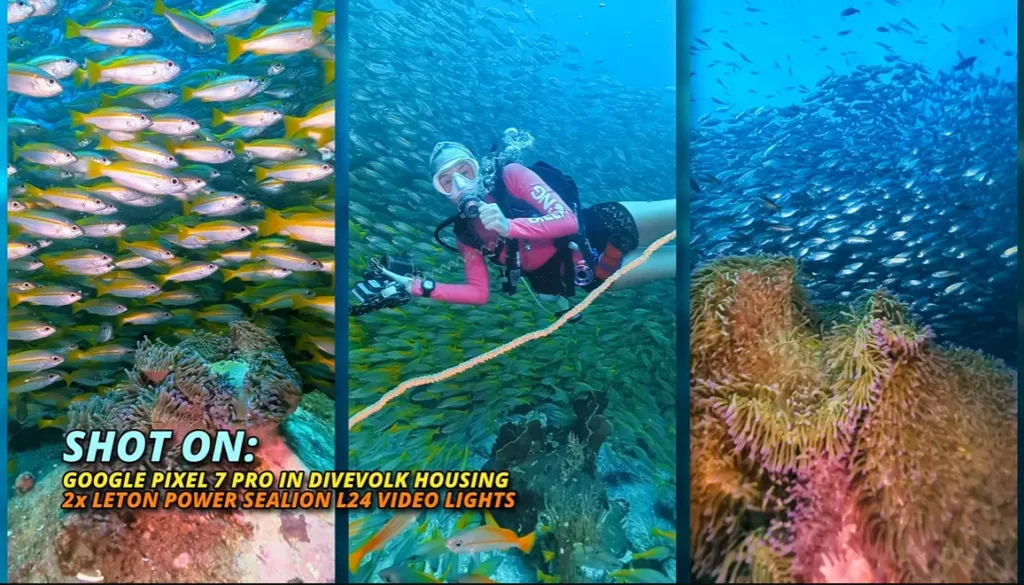
Get close — then get closer
This is probably the most important practical lesson we’ve learned.
Even powerful underwater video lights have a limited effective range.
Light is absorbed and scattered as it travels through water, so the farther you are from your subject, the less impact your lights will have.
You might have a pair of powerful lights, but that doesn’t mean you can illuminate an entire reef from three or four metres away.
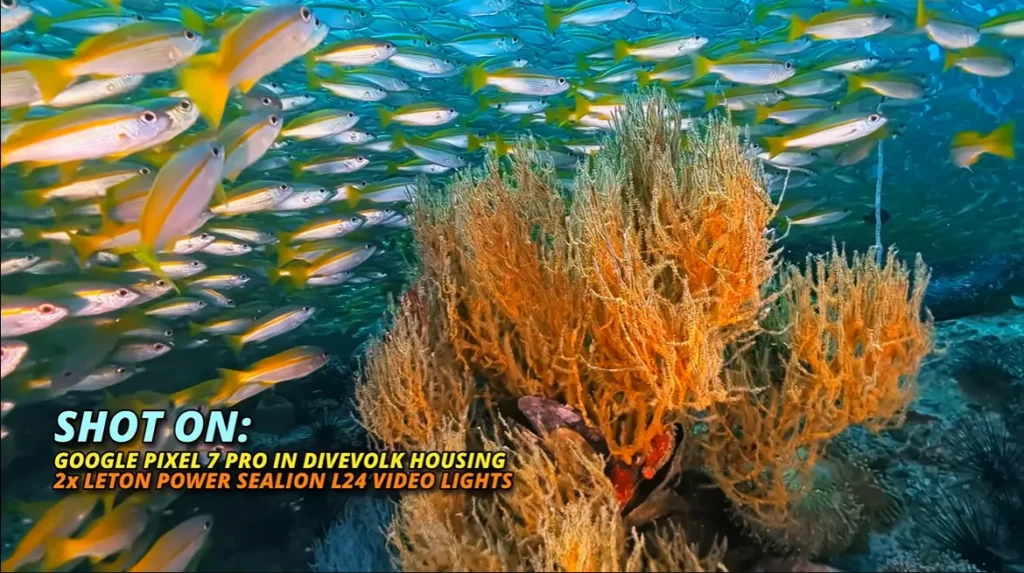
We often get our most colourful results when filming subjects within roughly a metre of the camera.
Of course, that distance is only appropriate when you can maintain excellent buoyancy and avoid disturbing marine life or damaging the environment.
Never approach wildlife or fragile reef structures more closely just to improve a shot.
Try the colour-reveal technique
One of our favourite techniques uses the limited range of underwater lights creatively.
Imagine approaching a colourful reef composition.
From farther away, the scene looks predominantly blue because your video lights aren’t yet contributing much illumination.
As you slowly move closer, the light begins to reveal reds, yellows, oranges and purples.
The colours appear to emerge naturally as the camera approaches.
It’s a simple technique, but it can produce a beautiful sense of discovery.
To try it:
Choose a stationary subject or composition that can be approached without disturbing marine life.
Begin farther away, where ambient light dominates.
Keep your camera movement slow and controlled.
Maintain stable framing and neutral buoyancy.
Allow your video lights to gradually illuminate the foreground as you approach.
Stop at a respectful distance and hold the final composition.
The trick is to let the movement and lighting reveal the scene rather than rushing towards it.
Think about movement, not just brightness
Good underwater footage doesn’t have to involve constant swimming.
Sometimes the strongest shot is a slow, steady movement towards a subject.
Other times, holding a stable composition while a fish swims through the frame is much more effective.
Try to avoid abrupt turns, excessive camera movement and unnecessary adjustments.
And don’t forget to give yourself enough time before and after the main action for editing.
9. Underwater Video Lighting, Buoyancy and Marine Life Safety
This is the part of underwater videography we wish more people discussed.
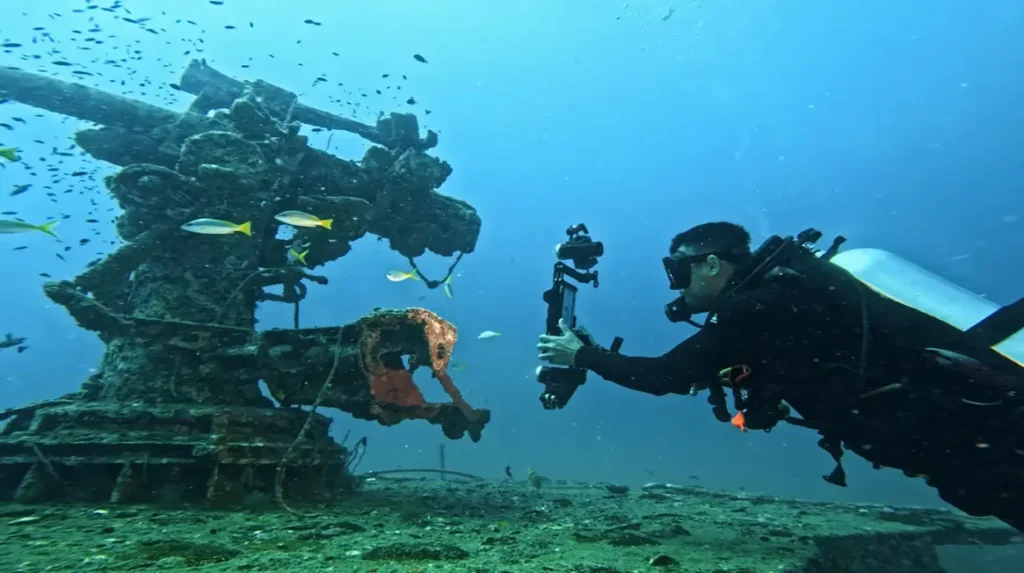
Adding a camera, tray, float arms and powerful lights to your dive equipment introduces extra task loading.
You’re suddenly thinking about composition, exposure, light positioning, camera controls and battery life — while still needing to manage everything involved in scuba diving.
That can become a serious distraction if your buoyancy, trim and situational awareness aren’t already comfortable.
Master your buoyancy before adding a large camera rig
Before taking a complicated lighting setup underwater, make sure you’re confident maintaining your position without using your hands or making uncontrolled fin movements.
Practise with new equipment on an easy dive.
Check that the rig is secure, comfortable and doesn’t interfere with your other dive equipment.
Remember that the buoyancy of your camera system is separate from your personal weighting requirements.
If you change your equipment configuration significantly, assess it carefully rather than making assumptions.
And never let filming distract you from your depth, gas supply, buddy or dive plan.
Respect marine life when using powerful lights
Bright underwater video lights can affect animal behaviour.
Some animals appear relatively tolerant of illumination, while others may turn away, hide or change their movements.
We try to approach subjects slowly, with our lights directed away or reduced until we’re ready to film.
Then we observe their behaviour carefully.
If an animal turns away, retreats or appears disturbed, we reduce the light or stop filming.
We never chase an animal that’s trying to leave.
It’s also important to check local regulations, as lighting restrictions may apply to particular species, protected areas or activities.
No underwater shot is worth compromising an animal’s wellbeing.
Sometimes the best decision is to turn the lights off and enjoy the encounter.
Be considerate of other divers
Powerful lights can also be unpleasant for your fellow divers.
Avoid shining them directly into someone’s mask, particularly on night dives.
When diving in a group, we often prefer to hang back and allow everyone else to enjoy the encounter first.
Once the group has moved on, we can take our time with the camera without blocking other divers’ views or crowding the subject.
If underwater filming is a major priority for your trip, consider arranging a private guide or photography-focused dive where appropriate.
That can give you more flexibility while reducing pressure on other guests.
Common Underwater Video Lighting Problems and How to Fix Them
| Problem | Likely cause | What to try |
|---|---|---|
| Footage is still blue | Subject is too far away for the lights to be effective | Film a suitable subject at a closer, safe distance |
| Bright centre, dark edges | Narrow or uneven beam | Use a wider flood light or adjust dual-light positioning |
| White particles everywhere | Backscatter | Move lights away from the lens and adjust beam angles |
| Footage looks too red | Red filter still attached or unsuitable white balance | Remove filter and review white balance |
| Grainy footage | Insufficient exposure or high ISO | Increase useful illumination, adjust exposure or reduce frame rate |
| Colours change during a clip | Automatic white balance shifting | Try fixed white balance |
| Camera rig feels heavy | Excessive negative buoyancy | Review float-arm configuration |
| Footage looks shaky | Unstable movement or rig handling | Practise buoyancy and use slower camera movements |
| Animals retreat from the lights | Excessive disturbance | Reduce or switch off lights and give animals space |
What Underwater Video Lighting Setup Should You Buy?
There’s no single lighting system that’s right for every underwater videographer.
If you’re just starting out and mainly filming macro subjects, a compact single-light setup may be all you need.
If you’re using a GoPro or another wide-angle action camera and want more consistent illumination, two wide-beam lights on a balanced tray can be a worthwhile investment.
And if you’re filming larger scenes regularly, it’s worth considering higher-output lights with good beam quality, dependable battery systems and controls that are easy to operate underwater.
For our own filming, we’re currently enjoying the LetonPower Sealion L24, particularly its colour profile and balanced coverage.
But our long-serving SUPE PV52T lights are a reminder that equipment doesn’t suddenly become obsolete when something newer comes along.
The best underwater video lights are the ones that suit your camera, your subjects, your diving and your budget.
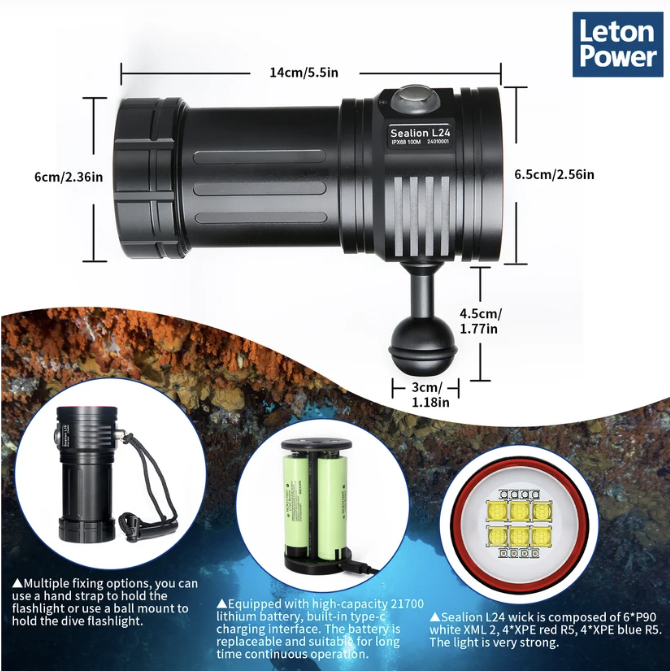
Explore the underwater lights we’re currently using – 15% OFF code: ‘AaronCassie’
Affiliate disclosure: LetonPower supplied our lights for testing. We may earn a commission on qualifying purchases through our link, at no additional cost to you.
Frequently Asked Questions About Underwater Video Lights
Do I need underwater video lights for a GoPro?
Not always. In bright, shallow water, you can capture excellent footage using natural light. However, underwater video lights become increasingly useful when filming deeper, in shaded conditions or close to colourful subjects.
How many lumens do I need for underwater video?
For close-up subjects, around 2,000–3,000 lumens can be a useful starting point. Wider scenes may benefit from more powerful lights, often around 5,000 lumens or more per light. Beam angle, subject distance and water conditions matter just as much as the lumen rating.
Is one underwater video light enough?
Yes, particularly for macro and close-up filming. Two lights provide greater flexibility for even illumination across wider compositions, but they also add cost, weight and complexity.
What is the best position for underwater video lights?
We generally position our lights away from the camera lens on adjustable arms, angling them slightly outwards to reduce the illumination of particles directly in front of the lens. The ideal positioning changes with subject distance and lens angle.
Can underwater video lights reduce backscatter?
Good positioning can help reduce backscatter, but the lights themselves don’t eliminate it. Water clarity, suspended particles, buoyancy and subject distance all influence the result.
Should I use a red filter with underwater video lights?
Generally, remove a red correction filter when using white video lights to illuminate your subject. Keeping it attached can produce an excessive red cast and reduce the light reaching the sensor.
Are more expensive underwater video lights always better?
No. More expensive lights may offer higher output, better beam quality, stronger construction or additional features, but those improvements aren’t necessarily useful for every diver. Consider what you film and how frequently you use the equipment.
Are LetonPower lights better than SUPE?
We prefer the colour profile and slightly wider, more balanced coverage of the LetonPower lights we’ve been using. However, our SUPE lights have served us well for years, and we wouldn’t recommend replacing a perfectly good lighting system without a clear reason.
Final Thoughts: Better Underwater Video Starts With Better Lighting Technique
Underwater video lights can make a remarkable difference to your footage, but buying brighter equipment isn’t the whole answer.
Understanding beam coverage, positioning, camera settings and subject distance is what allows you to get the most from your setup.
And as divers, we have a responsibility to make sure our photography doesn’t compromise buoyancy, safety or the marine life we’ve come to enjoy.
Whether you’re filming with a compact action camera, experimenting with your first video light or upgrading to a more advanced dual-light rig, our advice is simple:
Start with the equipment you need, learn how to use it properly and let the underwater world do the rest.
Have questions about underwater video lights or camera settings? Leave us a comment below or join the conversation on our YouTube channel.
And if you’d like to see these techniques in action, watch our full underwater video lighting tutorial.